
What Is WDR on Dash Cam: Night Specs, DWDR & HDR
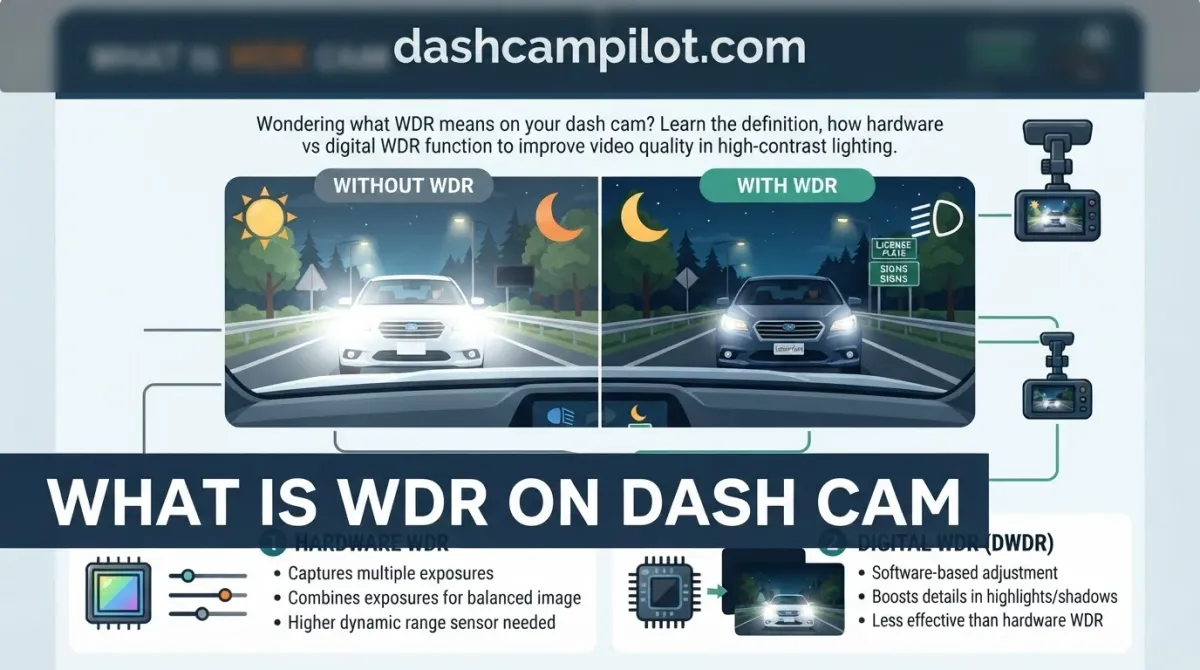
Driving into blinding sunlight or emerging from a dark tunnel often leaves dash cam video unusable, washing out license plates or drowning details in deep shadows.
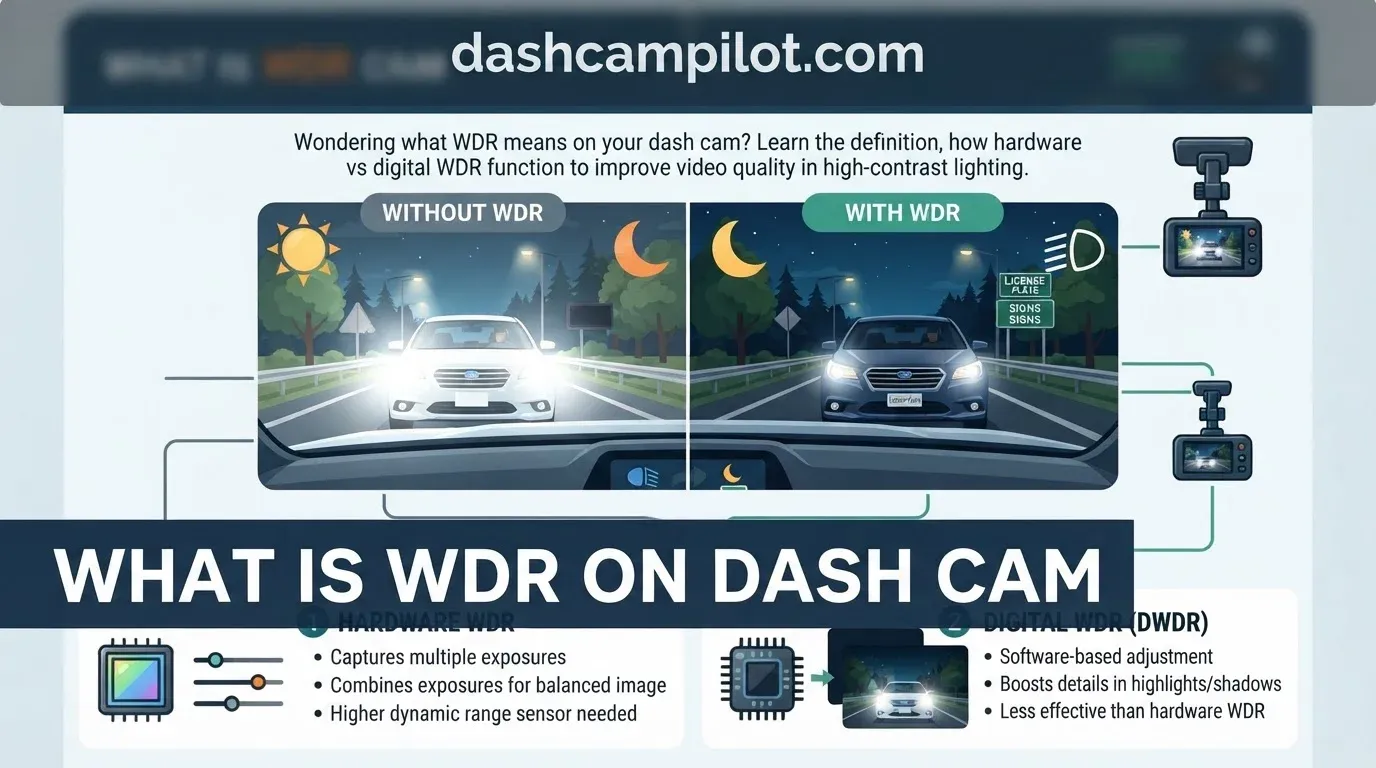
WDR, which stands for Wide Dynamic Range, is an imaging technology that balances extreme light and dark exposures across a single frame. By harmonizing high-contrast lighting in real time, it preserves vital road evidence whether you face oncoming high beams or midday glare.
This overview covers how WDR functions, how it compares to alternative processing methods like HDR, and when to keep it active during your daily drives.
What Is WDR on a Dash Cam? The Basics Explained
Definition of Wide Dynamic Range in In-Car Cameras
WDR stands for Wide Dynamic Range. In automotive dash cams, it is a combined hardware and image-processing capability specifically engineered to handle severe lighting contrasts occurring across the driving environment.

On any journey, dash cams encounter uneven lighting that conventional sensors cannot balance. WDR solves the dual problem of overexposure (blown highlights) and underexposure (crushed blacks) within a single video frame, ensuring neither extreme wipes out visual evidence.

A classic scenario occurs when driving out of a pitch-black parking garage or dark mountain tunnel directly into midday 100,000-lux sunshine. Without dynamic compensation, a lens is momentarily blinded. WDR balances these opposing light levels instantly to keep the frame readable.
Understanding Dynamic Range and Decibels (dB)
Dynamic range represents the ratio between the brightest highlights and darkest shadows an optical sensor can record simultaneously without losing texture. In automotive imaging, this dynamic performance is measured quantitatively in decibels (dB).
Traditional Standard Dynamic Range (SDR) applies a uniform exposure across the entire frame. Under high-contrast lighting, SDR inevitably clips critical detail, causing bright areas to overexpose (white out) and dark areas to underexpose (crush to black).
True WDR-equipped dash cams deliver a dynamic range capability between 100 and 120 dB. While performance varies by sensor quality and ISP (Image Signal Processor) capability, this range ensures that license plates, signage, and hazards remain identifiable in bright glare and deep shadows alike.
Breakdown: How WDR Technology Operates Under the Hood
The Optical Lens and Image Sensor Pipeline
Light enters through the dash cam's optical lens assembly and projects onto a specialized multi-exposure or dual-gain CMOS image sensor. Instead of capturing a single global exposure, the sensor records both high-light and deep-shadow data either simultaneously across interleaved lines or in rapid succession for every single frame.
Hardware WDR operates at the silicon level, fundamentally altering how photons are converted into digital values. By adjusting exposure timing and gain at the pixel or line level before saving the frame, the sensor prevents unrecoverable highlight clipping in blinding conditions while gathering sufficient electrical charge from dark shadows to retain crucial road details.
Dual-gain sensor architecture applies two distinct analog amplification curves to every photosite simultaneously. This splits high-intensity and low-intensity light paths during physical readout, neutralizing harsh glare before the analog signal is ever digitized.
The Image Signal Processor (ISP) and Tone-Mapping Algorithms
These raw sensor readings immediately stream into the Image Signal Processor (ISP), a dedicated compute engine inside the camera's system-on-chip (SoC). The ISP runs proprietary tone-mapping algorithms designed to synthesize the divergent exposure feeds into a cohesive, balanced image in real time without introducing processing latency.
This synthesis requires massive computational throughput. For example, an ISP processing 60 million pixels per second at 1080p60 must merge multiple exposure values on a system-on-chip with zero frame drops. The firmware evaluates spatial luminance variations across thousands of microscopic sectors, dynamically adjusting local contrast curves per zone within each frame.
Once the tone-mapping engine balances luminance across all designated zones, the optimized image passes to the video encoder. The resulting video stream delivers a stable frame rate output of 30 to 60 fps (varies by camera model and resolution settings), yielding evenly balanced video files saved directly to local storage.
Hardware WDR vs. Digital WDR (DWDR): Key Differences
True Hardware-Level Sensor Processing
True hardware WDR captures wide contrast directly at the silicon level. The camera relies on advanced physical sensor capabilities, such as dual-gain readouts or multi-exposure lines, during the initial exposure process.
For example, a dash cam equipped with a Sony STARVIS sensor uses true dual-readout hardware. This technology captures rich dynamic data natively, keeping bright skies and dark road shoulders balanced before encoding.
Digital WDR (DWDR) Limitations and Software Tricks
Digital WDR (DWDR) is a software-only filter that lightens shadows and darkens highlights across a standard image. It applies post-processing tone mapping to an ordinary single-exposure SDR frame rather than expanding physical dynamic range.
Lifting dark areas via artificial digital gain causes severe noise, color banding, and pixelation. Important road details like license plates often dissolve into grainy blur in low-light conditions.
Budget dash cams often market DWDR as "WDR" without disclosing sensor limitations. A $30 budget dash cam claiming "WDR" typically relies on this cheap software shadow lift, leading buyers to confuse low-end processing with true sensor-level performance.
How to Read This Comparison
The table contrasts physical sensor architecture against algorithmic post-processing. "Processing Domain" specifies where the image transformation occurs: inside the silicon photodiodes (Hardware WDR) or later inside the image signal processor via firmware (DWDR).
"Exposure Method" outlines how light data is gathered. True hardware systems read dual native gains simultaneously or interlace multiple physical exposures. Digital WDR utilizes only a single SDR frame, pulling luminance upward artificially.
When shopping, examine the dash cam's component sheet rather than retail packaging. If a listing advertises "WDR" without naming a verified sensor architecture, verify the exact sensor configuration with the manufacturer to ensure it is not simple software DWDR.
What Does WDR Do on Dash Cam Footage at Night?
Night driving creates extreme contrast between dark pavement and intense artificial lights. Dash cam sensors must simultaneously capture pitch-black road surfaces, unlit shoulders, and glaring light sources. Without dynamic range balancing, standard footage clips into pure black or blown-out white.
True WDR depends heavily on both the optical sensor (e.g., Sony STARVIS series) and the onboard image signal processor. Hardware sensors like Sony STARVIS use backside-illuminated architecture to maximize sensitivity in tandem with WDR, gathering scarce ambient photons to illuminate dark roadways without washing out nearby light points.
Taming Headlight Glare and Streetlamp Halo Effects
Oncoming halogen and modern high-output LED headlights emit concentrated beams that easily overwhelm standard camera sensors. This generates severe optical artifacts, including blinding starburst flares, wide light streaks, and fuzzy bloom or halo effects surrounding municipal streetlamps.
WDR suppresses glare, starbursts, and bloom/halo effects from oncoming halogen and LED headlights by dynamically adjusting exposure thresholds. By attenuating high-lux hotspots, the system keeps lane dividers, curbs, and nearby vehicles visible instead of letting them drown in blinding scatter.
License Plate Readability in Low-Light Scenarios
The most common failure in night surveillance is license plate capture. Modern plates use retroreflective sheeting engineered to bounce light straight back to its source, creating an extreme localized exposure spike directly in front of the dash cam.
For example, picture your car headlights projecting 3,000 lumens onto an embossed reflective license plate five feet ahead at a red light. Without rapid exposure adjustment, the reflected beam completely oversaturates the sensor pixels.
At night, WDR prevents highly reflective license plates from turning into illegible white rectangles when hit by vehicle headlights. By reigning in extreme brightness peaks and balancing local contrast, the processor maintains sharp definition on embossed alphanumeric text, ensuring critical tag numbers remain readable during insurance claims.
WDR vs HDR in Dash Cams: Technical Comparison
Multi-Frame Exposure Blending in HDR
HDR expands dynamic range through temporal image synthesis. HDR typically merges two or more full frames taken at different shutter speeds via software, whereas WDR balances lighting within a single frame or via dual-gain sensor readouts at the hardware level.
Because the sensor captures underexposed, standard, and overexposed frames in rapid succession, physical displacement occurs between cycles. Consequently, multi-frame HDR can introduce ghosting and motion blur on high-speed moving vehicles.
For example, when capturing an oncoming vehicle at 60 mph: HDR may create dual-contour ghost artifacts, whereas WDR preserves single-edge clarity across reflective surfaces like retroreflective license plates.
Single-Frame Balancing in WDR
WDR traditionally balances extreme contrast within a single frame or via split-line/dual-gain sensor exposures. The sensor manages pixel saturation at the photodiode level before routing visual data to the image processor.
Because tone mapping occurs across a unified temporal capture, single-frame/hardware WDR maintains sharper frame boundaries during high-speed transit. This eliminates position mismatch between bright headlights and vehicle bodywork.
Processing overhead remains lower because the ISP does not need to align, register, or buffer disparate full frames, preventing latency and dropping frame rates under heavy processing loads.
WDR vs. HDR Feature Breakdown
How to Read This Chart
This comparison outlines the structural differences between WDR and HDR processing pipelines in vehicle dash cams. The "Technology Type" column defines the underlying architectural standard implemented by the sensor and image signal processor (ISP). "Frame Capture Method" indicates whether the exposure data originates from a unified sensor readout or consecutive multi-frame exposures. "ISP Buffer Load" measures processing overhead, reflecting the system memory required to synthesize the image before file compression. Finally, "High-Speed Blur Vulnerability" evaluates risk of optical artifacts when tracking vehicles moving past the lens at highway speeds. For hybrid systems such as Digital Overlap HDR (DOL-HDR), motion stability varies based on line readout speed and clock rate; consult individual camera documentation to verify specific performance parameters.
Understanding WDR Drawbacks: Grain, Noise, and Blur
A frequent misconception is believing WDR increases video resolution or sensor sharpness. In reality, the feature exclusively manages luminance dynamic range. It balances extreme exposure variances across shadows and highlights, but it does not add native detail, improve optical focus, or increase pixel density.
Background Noise and Shadow Graininess
Enabling WDR in very dark environments can elevate background noise or grain. Because the image signal processor forcefully boosts underexposed shadow details, it amplifies sensor readout noise, introducing noticeable chroma and luminance grain across low-contrast frames.
For example, on a rural backroad with no streetlights, WDR aggressively boosts shadow gain to reveal roadside terrain. Instead of rendering clean, dark shadows, this processing creates a fuzzy, speckled black sky and muddy tarmac.
The Motion Blur vs. Shutter Speed Myth
Another widespread mistake is assuming WDR guarantees license plate capture at highway speeds, ignoring that motion blur and shutter speed dictate legibility. WDR balances illumination, but it cannot defeat optical motion blur caused by slow shutter speeds on fast-moving targets.
If a dash cam drops to a 1/30-second shutter to gather ambient night light, a vehicle passing at 60 mph will inevitably smear. Balanced exposure across reflective plates cannot overcome physical motion blur.
Edge Haloes and Tone-Mapping Artifacts
To fit high-contrast scenes onto standard displays, processing chips rely on tone-mapping algorithms. These algorithms compress broad contrast ratios, which can occasionally produce faint halo artifacts around high-contrast edges.
These glowing edge distortions typically appear around dark vehicle silhouettes against pale skies, along building perimeters, or directly around oncoming headlights, subtly reducing perceived edge sharpness in critical frames.
Should You Turn WDR On or Off on Your Dash Cam?
Many drivers assume WDR is always better left on. While WDR exists to solve severe contrast differences in a single frame—such as exiting a dark tunnel into harsh sunlight—it is not universally optimal across every driving condition.
When to Keep WDR Enabled (City, Commute, High Contrast)
Urban and highway commuters should keep true hardware WDR enabled by default. Daily metro driving involves fast exposure swings caused by overhead streetlights, neon signs, headlights, and sudden shadow transitions between high-rise buildings.
However, evaluate your dash cam's capabilities first. You should disable digital WDR (DWDR) if your budget camera uses low-grade software filtering that muddies daytime video, softens license plate edges, and introduces artificial smearing across movement.
When to Consider Disabling WDR (Pitch-Black Rural Roads)
When driving in pitch-black rural areas with zero ambient lighting, turning WDR off can reduce distracting sensor grain. In low-contrast darkness, WDR algorithms aggressively boost shadows where there is no actual image data to recover.
This unnecessary shadow boosting triggers heavy noise amplification, filling the frame with static and pixelated artifacts. Disabling WDR allows deep blacks to remain dark, yielding a cleaner focal point inside your headlight beam.
Optimizing Exposure Value (EV) Settings Alongside WDR
WDR naturally lifts shadow regions, but your vehicle's headlights can easily overexpose reflective road signs and white license plates. You can counter this by pairing dynamic range processing with a manual Exposure Value adjustment between -0.3 EV and -0.7 EV.
For instance, setting EV to -0.33 on an urban commute optimizes the WDR tone curve weighting against reflective license plates. This slight underexposure clips hot specular highlights, ensuring text remains sharp and legible while WDR preserves surrounding low-light roadway details.
- ✓ Core Concept: WDR balances exposure across high-contrast environments to preserve both shadow and highlight clarity.
- ✓ Under the Hood: Hardware WDR processes light data directly at the sensor level, while Digital WDR (DWDR) merely alters pixel contrast via software post-processing.
- ✓ Nighttime Function: WDR mitigates headlight wash on retroreflective license plates and lifts dark roadside perimeters.
- ✓ Technical Distinction: WDR adjusts dynamic range rapidly per sensor scan line, whereas traditional HDR blends distinct bracketed frames.
- ✓ Best Practice: Keep WDR enabled for typical daily driving, testing footage periodically to ensure software sharpening is not introducing digital noise.
❓ Frequently Asked Questions
1 What is WDR on a dash cam?
WDR stands for Wide Dynamic Range. In dash cams, this imaging feature adjusts the balance between harsh highlights and dark shadows in real time. It ensures that critical driving details, like reflective license plates under headlights or shaded road hazards, stay visible regardless of unpredictable, high-contrast lighting conditions.
2 How does WDR work on a dash cam?
Hardware WDR works by capturing varying exposure levels within the image sensor almost simultaneously. Light and dark exposures are processed and merged into a single balanced frame. This algorithm lifts dark shadow zones without blowing out bright elements, preventing headlight glare or midday sun from ruining critical video evidence.
3 Is WDR better than HDR on dash cams?
Neither is strictly superior; they utilize different technical approaches. While High Dynamic Range (HDR) combines distinct bracketed frames to achieve wider contrast, WDR dynamically adjusts exposure per pixel line or sensor cycle. HDR often delivers richer color depth, but WDR frequently handles rapid motion with fewer blurring artifacts.
4 Does WDR improve night vision recording?
Yes, WDR is crucial for night driving. Roadway scenes at night exhibit extreme contrast between black surroundings and intense headlights. WDR tones down blinding light reflections off street signs and license plates while brightening unlit shoulders, producing a clear overview of potential road hazards that standard sensors completely obscure.
5 Should I leave WDR on or off?
You should keep WDR turned on for standard driving. It provides significant benefits when navigating tunnels, direct sunlight, and nighttime traffic. Only turn it off if you own an entry-level dash cam where budget software processing causes excessive digital grain or motion smearing in extremely dark conditions.
6 What does WDR do on a dash cam?
Explain that WDR balances high-contrast scenes by brightening dark shadows and dampening intense highlights simultaneously, ensuring critical road evidence like plates and street signs remains legible.