What Is a 3 Channel Dash Cam: Front, Cabin & Rear Setup
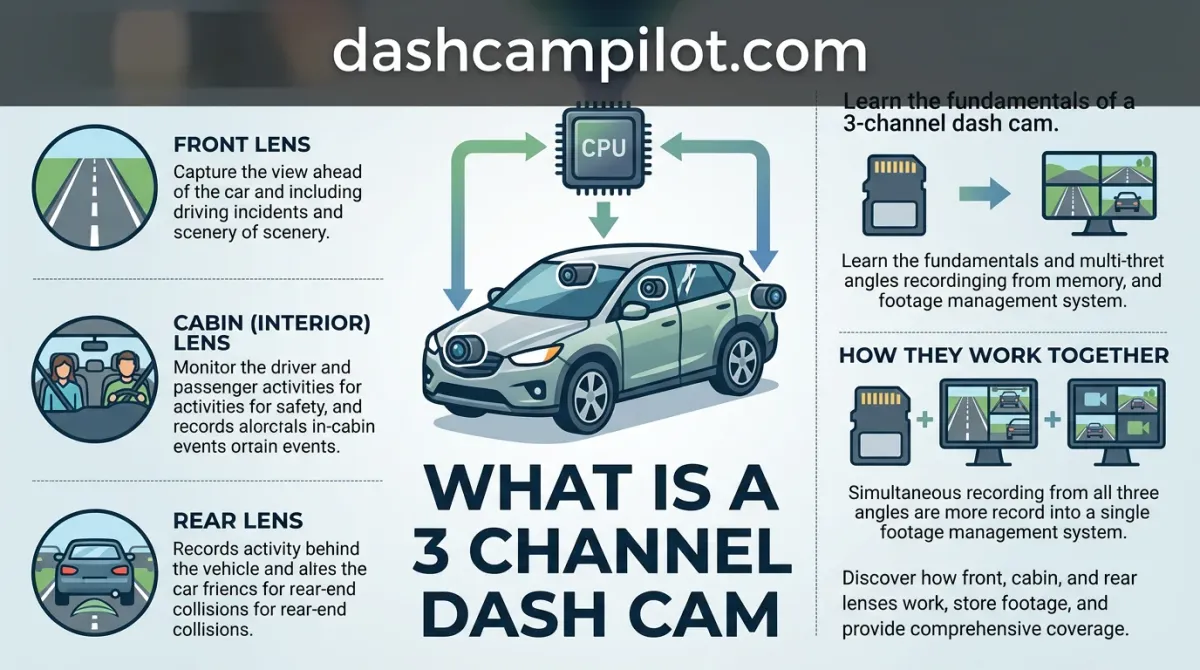
Standard dash cams monitor only the road ahead, leaving massive blind spots around your vehicle during an accident or traffic stop. A 3-channel dash cam solves this problem by using three synchronized camera lenses to record the front exterior, the rear traffic, and the vehicle's interior cabin simultaneously onto a single memory card.
Originally popularized by rideshare and commercial fleet operators, these triple-camera setups now give everyday motorists complete visual context during sudden collisions and parked hit-and-run events.
The following sections explain how these multi-lens units manage data, compare them directly against dual-camera setups, and highlight key requirements for high-endurance memory, parking power, cabin audio consent, and clean vehicle installation.
Understanding What a 3-Channel Dash Cam Is and How It Works
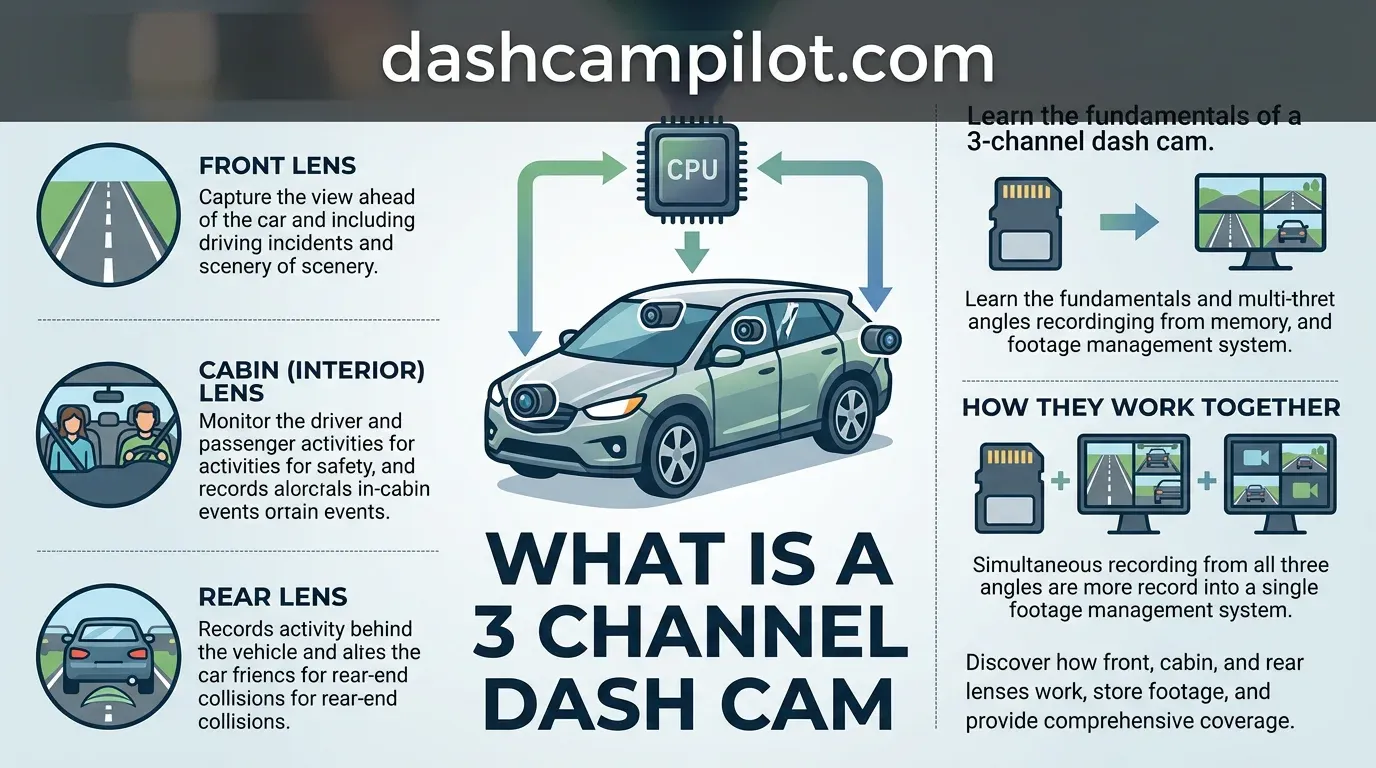
A 3-channel dash cam—commonly designated as a tri-channel system—is a vehicle surveillance setup engineered to monitor three critical perspectives at once. While standard setups document only the road ahead, a 3-channel dash cam simultaneously writes three distinct video feeds: front road, cabin/interior, and rear exterior.

Simultaneous Three-Stream Recording Architecture
At the foundation of this setup is a high-throughput system-on-chip (SoC) processor. The central processor ingests, synchronizes, and encodes continuous visual data incoming concurrently from the primary windshield lens, an interior cabin camera, and a remote wired rear-window unit.
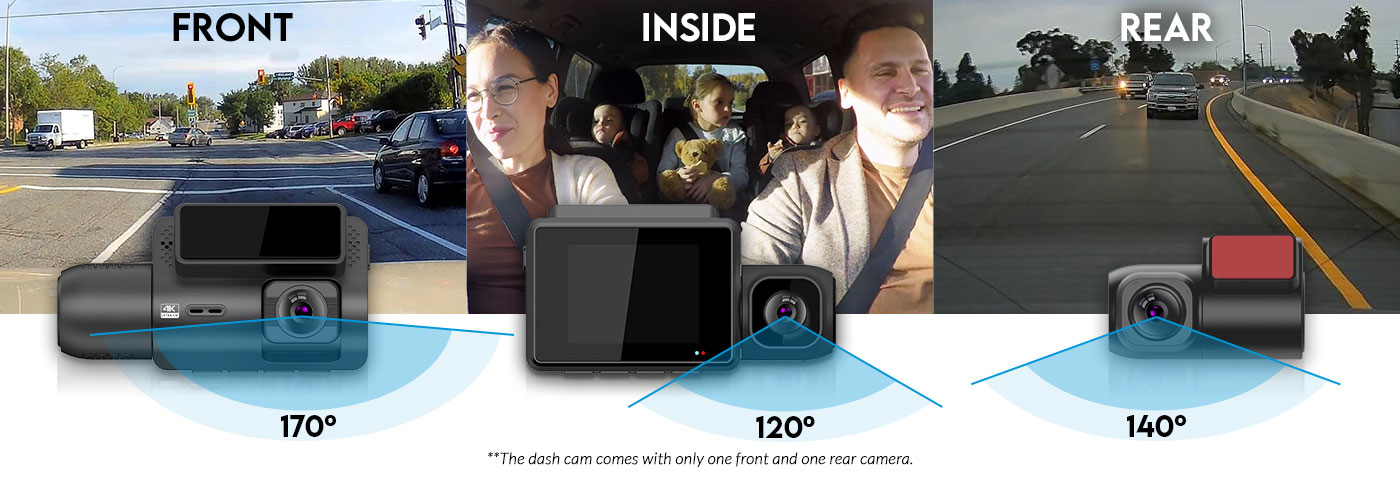
To manage localized storage without manual maintenance, the unit deploys partitioned loop recording. Loop recording continuously overwrites the oldest unlocked footage independently across all three video streams, guaranteeing non-stop operation while keeping emergency G-sensor incident files protected from deletion.
Independent Video File Generation vs Split-Screen Feeds
Legacy multi-camera units often stitched separate views into a single low-resolution split-screen video feed, severely degrading pixel density. Unlike split-screen outputs, modern systems encode and write three discrete video files simultaneously to the memory card at their full native resolutions.
For example, an incident at an intersection writes separate FRONT001.mp4, CABIN001.mp4, and REAR001.mp4 files with synchronized timestamps. Each camera angle preserves its own video track, complete frame rate, and sensor metadata without sacrificing visual real estate.
During post-incident playback, synchronized timecodes allow you to match the exact second across all perspectives. You can verify driver attention inside the cabin alongside forward traffic light signals and rear approach speeds, establishing complete, tamper-resistant evidentiary context.
Breakdown of the Three Camera Channels and Key Components
Front Windshield Master Unit and Processor Hub
The forward-facing camera mounts behind the rearview mirror and serves as the primary hardware hub. This master unit houses the multi-core system-on-chip (SoC) processor, the central microSD card slot, and the primary 12V/5V power delivery input.
Because it monitors oncoming traffic, its lens optics usually deliver an ultra-wide field of view (FOV) between 140 and 170 degrees. The internal processor directly decodes this stream while coordinating the data feeds incoming from the other two channels.
Across all three channels, lens optics generally range from 130 to 170 degrees FOV. Wider angles capture more peripheral lanes, while narrower angles preserve license plate readability at greater distances.
Interior Passenger Compartment Camera
The interior channel focuses on cabin occupants and driver behavior. System designs handle this unit in two ways: by integrating the secondary lens directly into an all-in-one dual housing on the windshield, or by separating it into a standalone module attached via an 8-inch USB-C link.
The detached mini-module design allows flexible placement, such as mounting higher on the windshield or near the A-pillar. These lenses feature an approximate 130- to 150-degree FOV to span window-to-window coverage inside the vehicle cabin.
Rear Window Exterior Surveillance Unit
The third physical module is a low-profile exterior surveillance camera designed to adhere to the top edge of the rear windshield. It records tailgaters, rear collisions, and traffic approaching from behind the vehicle.
This camera lacks a local processor or storage card. Instead, it transmits digital video back to the master windshield hub through an insulated 20- to 25-foot coaxial or USB interconnect cable routed beneath the vehicle headliner and door trim.
Comparing 1-Channel, 2-Channel, and 3-Channel Dash Cams
Single vs Dual vs Triple Camera Coverage Gaps
Single-channel dash cams document only what happens directly ahead of your bumper. Because of this limited field of view, 1-channel models miss rear-end collisions and cabin interactions entirely, leaving drivers vulnerable during rear impacts, tailgating incidents, or internal vehicle disputes.
Stepping up to a 2-channel system improves awareness but forces a difficult operational compromise. You must choose between monitoring following traffic (Front + Rear) or capturing passenger behavior (Front + Cabin). Selecting one necessarily sacrifices the other.
Consider a rideshare driver being backed into at an intersection while simultaneously managing an unruly passenger. A Front + Cabin setup captures the passenger's misconduct but misses the collision impact behind the car, while a Front + Rear setup leaves the in-cabin assault unrecorded.
A 3-channel system eliminates these coverage gaps by monitoring the forward roadway, interior occupants, and rear traffic simultaneously. Keep in mind that front camera resolution is frequently downscaled when all three channels record concurrently compared to running front-only mode due to processor bandwidth limits.
How to Read the Channel Comparison Table
The table categorizes setups by their physical camera footprint and blind-spot trade-offs. "Standard Angles Covered" defines the primary views recorded during standard driving conditions. "Unmonitored Blind Spots" highlights the critical zones where liability or damage disputes go undocumented.
"Installation Cabling" indicates routing requirements from the main power source to peripheral sensors. While 1-channel and all-in-one 2-channel systems require minimal trim tucking, 3-channel systems route one long cable to the rear window, while the interior lens is either integrated into the front housing or routed nearby.
Four-channel units add external side cameras that demand weather-sealed pass-through wiring, adding labor. Note that exact resolutions per channel vary significantly by chipset brand; verify your specific hardware configuration for exact multi-channel pixel allocations.
When to Choose a 3-Channel Setup Over a 4-Channel System
While 4-channel dash cams introduce side-facing cameras to record lane-splitting cyclists or parking door dings, they demand significant trade-offs. Four-channel architectures require mounting exterior flank cameras, puncturing door grommets, or running complex wires through multiple vehicle pillars.
In contrast, 3-channel systems deliver full operational coverage without the extreme wiring complexity and cost of 4-channel flank cameras. They safeguard your vehicle from the three highest-risk collision points: forward impacts, following collisions, and passenger compartment claims.
For everyday rideshare drivers, commercial couriers, and family commuters, a 3-channel system hits the practical sweet spot. It provides the legal protection of full internal and external recording while keeping installation accessible and processing loads manageable.
Technical Fundamentals: Video Resolution, Bitrate, and IR Optics
Processor Bandwidth and Multi-Channel Resolution Scaling
Triple-channel setups push dash cam system-on-chip (SoC) hardware to strict processing limits. Because a single processor must compress and write three continuous video streams in real time, available encoding bandwidth must be divided among all connected sensors.
Consequently, processors frequently reduce front camera resolution from 4K (2160p) to 2K (1440p) when sharing encoding bandwidth across three channels. Front camera resolution generally operates between 1440p (2K) to 2160p (4K) pixels, while interior/rear camera resolution remains locked at 1080p (Full HD) pixels to avoid frame drops and thermal throttling.
Infrared (IR) Illumination for Total Darkness Cabin Capture
Standard glass lenses and optical sensors cannot register details inside an unlit passenger compartment. The interior-facing camera relies on infrared (IR) light to capture clear cabin footage in total darkness. Interior lenses require 940nm or 850nm infrared (IR) LEDs to capture legible footage in pitch-black vehicle interiors.
This setup produces crisp monochrome night footage illuminated by 4 discrete infrared LEDs allowing facial identification inside an unlit cabin. Diodes using the 940nm wavelength emit no visible light, preventing driver distraction during night journeys while maintaining sharp detail across all seating rows.
Vehicle cabins also encounter severe lighting swings from passing street lamps and oncoming traffic. High Dynamic Range (HDR) and Wide Dynamic Range (WDR) balance high-contrast cabin glare from exterior streetlights, preventing blown-out window highlights while retaining clear details in dark footwells.
MicroSD Card Requirements for Three-Channel Dash Cam Systems
The Write-Cycle Stress of Triple Video Streams
Writing three video feeds at once creates high write loads, requiring high-endurance memory cards to prevent write failure. Recording front, interior, and rear angles simultaneously multiplies write cycles by 300% compared to single-channel devices, putting immense stress on the storage controller.
Standard consumer TLC or QLC flash cards fail within months under this relentless strain. Because the dash cam writes to three active files continuously, high-endurance microSD cards using enterprise-grade NAND are mandatory to withstand sustained write speeds, constant overwrites, and extreme summer cabin temperatures.
Recommended Storage Capacities and Card Ratings
Triple-camera setups deplete available memory space rapidly. For example, calculating how three 1080p/1440p streams running at a combined 35 Mbps consume roughly 15.75 GB per hour shows why standard card sizes quickly fall short during daily driving.
A minimum card capacity of 128GB to 256GB is recommended to maintain a practical loop recording window of 6 to 12 hours. Choosing hardware within the recommended storage capacity of 128 to 512 gigabytes (GB) ensures adequate archival time before older driving files are overwritten.
Ensure the card carries a Video Speed Class 30 (V30) or UHS Speed Class 3 (U3) certification. These specifications guarantee a minimum sustained write performance of 30 MB/s, preventing buffer overruns, dropped frames, and damaged video containers across all three synchronized channels.
Power Consumption and Parking Surveillance Mode Basics
Running three optical lenses and a central processor simultaneously creates an operating power draw between 4 and 10 watts. This power consumption is roughly double that of a basic 1-channel camera, making energy management a critical concern during extended engine-off monitoring.
Hardwiring with Low-Voltage Cutoff Switches
Because of this elevated electrical load, continuous surveillance can quickly discharge a standard 12V car battery. Hardwire kits with selectable low-voltage cutoff switches prevent the dash cam from stranding the driver with a dead vehicle battery.
These cutoff modules monitor standing voltage and sever camera power once stored capacity drops below a selected limit. Setting a hardwire cutoff to 12.0V or 12.4V ensures a vehicle starts reliably in cold weather during 24-hour parking surveillance, preventing deep battery cycles.
Buffered Impact Detection vs Dedicated Auxiliary Battery Packs
Buffered parking mode keeps system sensors fully energized and constantly writes footage to temporary RAM cache. When triggered by G-force or motion, the device permanently saves the 10 to 15 seconds prior to the event, providing vital pre-impact context.
Because buffered surveillance draws nearly full operating wattage around the clock, vehicle voltage cutoffs may shut the system down within several hours. Drivers requiring uninterrupted multi-day coverage often install dedicated auxiliary LiFePO4 battery packs, which isolate the vehicle starter battery and recharge only while driving.
Legal Overview: Interior Audio Recording and Passenger Consent
One-Party vs Two-Party Consent Jurisdictions
Capturing visual footage inside a cabin is generally legal, but recording interior audio activates strict state and federal wiretapping statutes. Dash cam owners must navigate distinct legal frameworks categorized into one-party and two-party (all-party) consent jurisdictions.
In one-party regions, the driver alone can legally authorize audio recording. Conversely, strict two-party states require every vehicle occupant to give consent before their voices are captured. Muting interior microphone feeds within the dash cam firmware provides a dependable legal safeguard, preserving cabin video evidence while eliminating wiretapping liabilities.
Rideshare Compliance and Window Decal Requirements
Rideshare and commercial transport drivers face specific regulatory mandates when documenting the passenger cabin. Platforms like Uber and Lyft permit interior cameras, but local privacy statutes dictate operation. In two-party consent states such as California or Florida, recording passenger conversations without prior disclosure creates severe civil liability.
To maintain compliance, drivers must install prominent notification decals on passenger door windows before recording audio. These visible signs notify riders that entering the vehicle constitutes implied consent to active audio and video surveillance, satisfying legal disclosure thresholds in strict privacy jurisdictions.
Installing a 3-Channel Dash Cam Safely: Avoiding Major Pitfalls
Running cables for a three-camera setup requires careful planning. Connecting the front base unit to the rear window and cabin sensors creates long wiring runs that intersect vital vehicle safety equipment.
Routing Interconnect Wires Clear of Side Curtain Airbags
Tucking rear interconnect cables across side-curtain airbag deployment paths turns cables into projectiles during a collision. Never bridge wires across headliner trim seams where side airbags fire downward.
Wiring must be routed behind the airbag housing along the body frame, rather than tucked loosely across pillar seams. Side-curtain airbags deploy in milliseconds at over 100 mph, meaning any wire crossing the deployment path will violently rip free.
Use plastic trim tools to unseat the A-pillar weatherstripping and expose the chassis cavity. Route cables underneath the A-pillar weatherstripping and zip-tie them to existing vehicle harnesses directly behind the folded curtain airbag module.
Optimal Windshield and Rear Glass Placement
Mount the front camera high on the windshield behind the rear-view mirror. Place the lens within the active windshield wiper sweep zone to ensure clear forward-facing video during rainy and snowy conditions.
Positioning the cabin camera requires a balance between capturing all occupants and avoiding rear-view mirror obstruction. Install the interior lens just below the mirror housing to maintain an unobstructed view across all seating rows and side windows.
On the rear glass, place the third camera along the upper center edge. Avoid placing the lens directly over defroster grid lines to prevent image distortion and night-time glare.
- ✓ Simultaneous 360-degree recording captures front roadway incidents, interior passenger interactions, and rear-end collisions concurrently onto a single memory card.
- ✓ Cabin lenses integrate infrared (IR) LEDs to capture crisp black-and-white passenger footage even in pitch-black night driving conditions.
- ✓ Tri-channel video streams require high-endurance U3/V30 MicroSD cards with minimum 128GB to 256GB capacities to handle intense continuous write cycles.
- ✓ Hardwire installation with integrated low-voltage cutoffs is essential for reliable 24/7 parking mode without draining the vehicle starter battery.
- ✓ Cabin audio and video recording require compliance with state and regional passenger wiretapping and consent privacy regulations.
❓ Frequently Asked Questions
1 What is the core definition of a 3-channel dash cam?
By technical definition, a 3-channel dash cam is an integrated vehicle recording system containing three optical sensors. It captures the forward roadway, the interior vehicle cabin, and the rear traffic simultaneously. All three feeds are processed synchronously, writing individual high-definition video files to a centralized high-endurance memory storage card.
2 How does a 3-channel dash cam record in total darkness?
The interior-facing cabin camera relies on infrared (IR) light-emitting diodes surrounding the lens. While human eyes cannot perceive this infrared spectrum, the camera sensor absorbs it, producing clear, illuminated black-and-white footage of passengers and driver controls even when driving through unlit roads or dark parking structures at night.
3 What microSD card capacity is required for a 3-channel setup?
Because three simultaneous video streams triple the data throughput, you need a high-endurance MicroSD card rated at minimum U3 or V30 speeds. A 128GB card provides roughly six to eight hours of footage before looping, while a 256GB card is recommended to ensure adequate continuous incident retention.
4 What is the legal overview for recording cabin audio and video?
While exterior video recording in public spaces is universally legal, cabin audio recording intersects with wiretapping statutes. In two-party consent states, all vehicle occupants must consent to voice recording. Drivers and rideshare operators typically satisfy this legal requirement by posting prominent interior window decals informing passengers that surveillance is active.
5 How does parking mode work on a 3-channel dash cam?
Parking mode monitors your vehicle while the engine is off using motion detection, radar, or low-bitrate continuous recording across all three lenses. It requires a hardwired power connection to the fuse box or a dedicated battery pack, incorporating a low-voltage cutoff to prevent draining your 12-volt car battery.
6 What is the difference between a 2-channel and a 3-channel dash cam?
A 2-channel dash cam typically covers front and rear road views (or front and cabin), leaving one angle completely unmonitored. A 3-channel dash cam captures the road ahead, the vehicle interior, and the road behind at the same time.