Radar Parking Mode Dash Cam: Specs, Power Draw & Setup
Standard parking modes often drain your car battery or miss hit-and-runs because optical sensors record constantly or wake up too late. A radar parking mode dash cam solves this problem by using high-frequency radio waves to detect approaching movement before an impact occurs.
Instead of keeping power-hungry image sensors running, the unit stays in a deep, energy-efficient sleep until its radar module triggers pre-buffered recording.
This breakdown examines how radar compares to conventional optical surveillance, detailing power draw metrics, wake latency, hardware configurations, and mounting best practices for reliable vehicle protection.
What Is a Radar Parking Mode Dash Cam and How Does It Work?
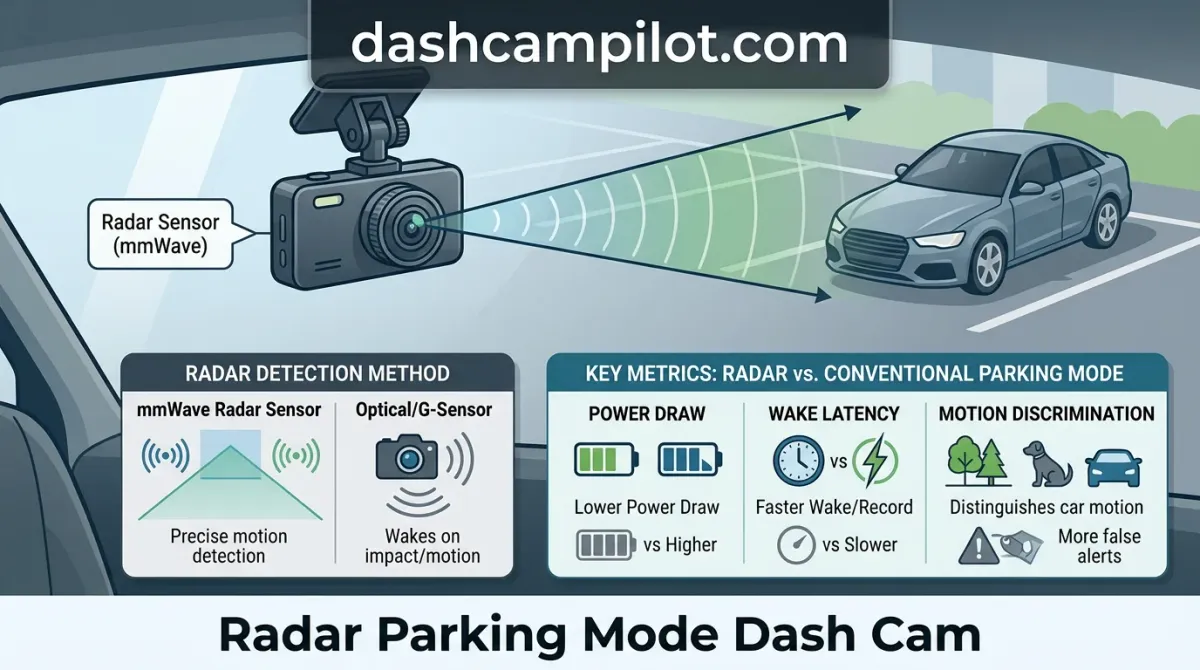
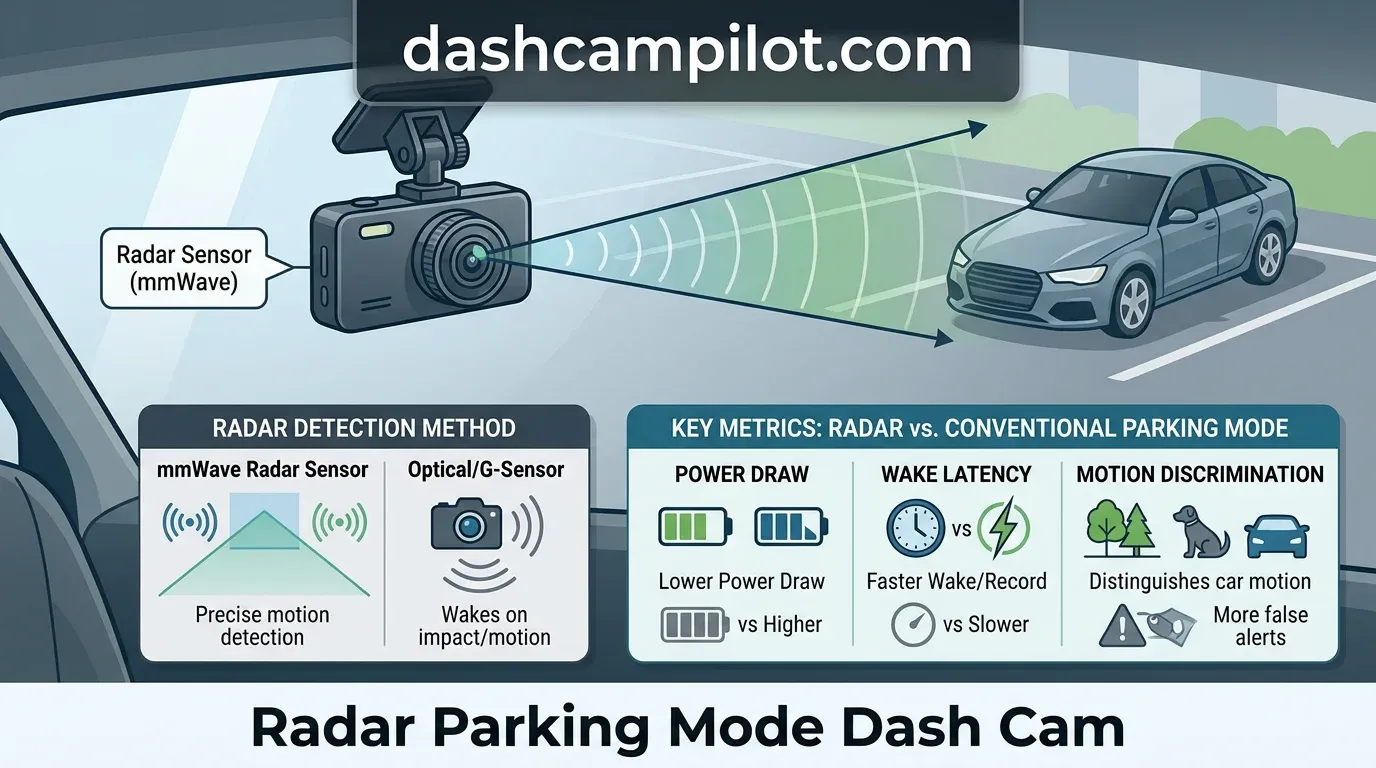
A radar parking mode dash cam uses high-frequency radio waves to detect moving objects while the vehicle is parked and turned off. Unlike standard dash cams that rely on continuous visual scanning, a radar-assisted device monitors the surrounding environment using compact radio frequency (RF) transceiver hardware.

This design directly solves the primary flaw of legacy parking modes: excessive vehicle battery drain and frequent false optical alerts. Environmental factors like shifting shadows, swaying tree limbs, and rainfall no longer trigger unnecessary recording cycles.
The Role of Millimeter-Wave (mmWave) Radio Waves
The radar unit functions by emitting continuous millimeter-wave (mmWave) radio signals through the vehicle windshield into the parking perimeter. These high-frequency electromagnetic waves travel outward until they strike physical obstacles—such as passing cars, cyclists, or pedestrians—and bounce back toward the receiver antenna.

Crucially, radar parking mode keeps the primary camera processor and image sensor in an ultra-low-power sleep state until motion is sensed. Because the mmWave module operates on a tiny baseline current, this mechanism dramatically extends parking surveillance time without draining the vehicle battery.
Target Detection via Doppler Frequency Shift
Radar detects target presence via radio frequency reflections and Doppler shift rather than optical analysis. When emitted waves reflect off a stationary backdrop, they return at their transmission frequency. However, when an object moves relative to the vehicle, the returning signal compresses or stretches, shifting its frequency.
For example, an approaching vehicle or pedestrian at 5 meters triggers an immediate frequency shift in reflected radio waves, instantly awakening the camera. The primary processor powers up only when moving physical mass crosses this detection threshold, ensuring timely incident recording with minimal standby draw.
Radar Motion Detection vs Optical Sensors: Technical Insights
Limitations of Optical Pixel Comparison
Traditional parking surveillance relies on continuous visual analysis. Optical motion detection constantly powers the CMOS sensor to compare frame-by-frame pixel changes, causing high battery drain and thermal buildup. This method requires the image processor to stay active around the clock just to monitor static scenes.
Because optical algorithms only calculate two-dimensional shifts in brightness and color values, they lack genuine depth perception. Windblown branches casting moving shadows on the hood trigger continuous optical recordings but zero radar triggers, needlessly cluttering storage cards with empty footage.
Illumination constraints also handicap camera-only setups. Radar functions reliably in absolute pitch-black darkness where optical sensors fail to perceive motion. Without streetlights or moonlight to illuminate contrast changes across pixels, an optical dash cam remains completely blind to approaching physical threats.
False Positive Rejection in Adverse Weather
Radar technology replaces visual guesswork with high-frequency electromagnetic pulses. Radar waves respond strictly to mass and physical displacement, providing superior false positive rejection. The sensor calculates true object velocity via frequency shifts rather than superficial surface illumination.
Unlike optical motion detection, radar does not trigger from ambient light changes, falling leaves, passing clouds, or heavy rain. High-frequency signals pass directly through precipitation droplets and low-density foliage, reflecting exclusively when a solid target—like a vehicle bumper or pedestrian—enters the perimeter.
Environmental triggers like heavy rain, tree shadows, headlights, and blowing leaves fool optical sensors but are ignored by radar. This mechanical distinction preserves crucial battery reserves strictly for actual physical risks.
Core Components of a Radar-Assisted Parking Monitor
Transceiver Frequencies: 24 GHz vs 60 to 77 GHz mmWave
The primary sensing element is the radio frequency (RF) transceiver, which emits electromagnetic waves to establish an active surveillance zone. The radar detection range spans 3 to 7 meters, though real-world reach varies by sensitivity settings, object size, and windshield composition.
Radar operational frequency typically sits at either 24 GHz or 60 to 77 GHz, which varies by hardware generation and regional RF regulatory allocations. Modern 60 to 77 GHz millimeter-wave (mmWave) transceivers deliver higher spatial resolution and utilize smaller antenna arrays than legacy 24 GHz sensors.
Internal Accelerometer (G-Sensor) Redundancy
An integrated three-axis accelerometer (G-sensor) works alongside the radar transceiver to provide hardware redundancy. While radar detects proximity and movement before contact, the G-sensor registers physical impacts independently, logging mechanical shocks even if a collision occurs outside the radar field.
Dash cam storage controllers route these triggers across dedicated partitioned MicroSD cards. Segmenting memory into distinct partitions isolates motion triggers, which prevents frequent parking motion clips from overwriting continuous driving loop files and severe impact logs.
Supercapacitor Thermal Protection and File Finalization
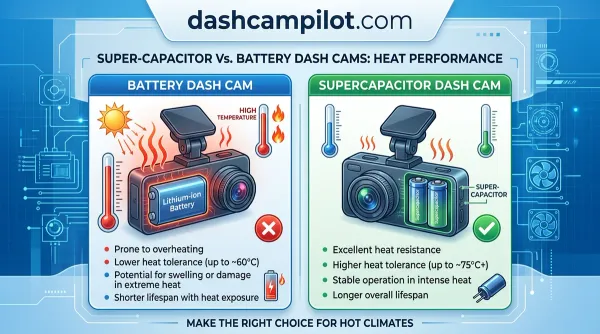
Reliable parking surveillance requires power hardware capable of surviving extreme cabin environments. Supercapacitors replace volatile lithium-ion batteries to prevent thermal degradation and battery swelling when a vehicle sits parked under direct sunlight.
Supercapacitors withstand windshield temperatures exceeding 140°F (60°C) without swelling, ensuring video files finish encoding if power drops. If an impact severs hardwire connections, the capacitor discharges stored energy to cleanly close file headers and finalize writes to flash memory.
Radar Parking Mode vs Time-Lapse and Impact Modes
Dash cams protect stationary vehicles using distinct monitoring strategies, each balancing battery longevity against video fidelity. Selecting the right parking setting determines whether your setup survives a weekend away or leaves critical incidents unrecorded.
G-sensor impact-only parking mode uses virtually no power until a collision occurs. However, because the system remains completely dormant until an impulse triggers the sensor, it misses pre-impact events, vandalism, and slow scratches that generate low vibration. Consequently, it routinely fails to document hit-and-run approaches.
Time-lapse provides uninterrupted visual timelines at 1 to 5 fps while cutting storage overhead. However, maintaining continuous sensor activity steadily depletes power and lacks high-frame-rate audio, which often obscures critical sound cues like tire squeals or conversations.
Low-bitrate mode maintains full-time recording at reduced resolution and encoding strength. Because the main system-on-chip and image sensor run non-stop, it exhausts vehicle batteries rapidly, limiting unattended monitoring windows to less than half a day.
Radar parking mode offers the best balance of multi-day endurance and high-resolution event capture. By keeping the power-hungry camera hardware asleep until an object enters proximity range, radar delivers extended standby intervals with full-framerate incident footage.
Feature and Power Breakdown by Parking Mode
How to Read Parking Mode Specifications
The estimated battery runtimes listed in hours reflect real-world testing using a standard lead-acid car battery (45–60 Ah) paired with a low-voltage cutoff switch set to 12.0V or 12.2V. Runtimes denote uninterrupted operation before the power management system cuts supply to safeguard vehicle ignition.
Capture quality specifies the frame delivery and resolution fidelity recorded to flash memory during an active surveillance event. Pre-event buffer capability indicates whether the hardware retains the moments preceding a trigger, allowing review of how a pedestrian or vehicle initially approached.
Exact endurance fluctuates across vehicle platforms. Sub-zero temperatures, older battery chemistries, and heavy-traffic parking locations that prompt repeated radar wakes will reduce total hours. G-sensor impact runtimes depend entirely on individual vehicle standby leakage and require user verification for exact system architecture.
Power Consumption Facts: Standby Draw and Hardwire Kit Setup
Quiescent Current Draw vs Active Recording Draw
Standard parking modes keep the image sensor and core processor continuously awake, pulling an active recording draw between 250 and 500 mA. This consumption rate fluctuates based on resolution (1080p vs 4K) and channel count (single, dual, or triple cameras).
By keeping the primary processing units in deep sleep, radar mode slashes quiescent standby current down to sub-10 to 50 mA. The exact quiescent consumption varies by internal vs external radar design and sleep-state architecture, drastically extending surveillance duration.
Three-Wire Hardwire Kit Requirements
A three-wire hardwire kit is non-negotiable for the camera to detect ignition state transitions. The harness requires three distinct electrical connections: constant power (BATT), switched ignition power (ACC), and a vehicle chassis ground (GND).
This physical configuration informs the dash cam the moment the engine stops. When ACC voltage drops, the camera firmware automatically steps down from standard operating mode into its ultra-low-power radar standby state without manual intervention.
Configuring Low-Voltage Disconnect (LVD) Cutoffs
Configurable low-voltage disconnect (LVD) switches protect vehicle starting batteries by isolating the camera before critical discharge occurs. Cutoff settings typically range from 11.8V to 12.4V, adjusted via physical switches on the cable or inside the camera software.
For instance, setting the hardwire cutoff to 12.2V ensures an AGM vehicle battery retains sufficient cranking power to start in freezing winter conditions, when cold temperatures suppress standard battery capacity.
For extended monitoring without taxing the starter battery, auxiliary LiFePO4 battery packs can eliminate car starter battery drain entirely. These independent lithium iron phosphate units supply all parking power and recharge via the alternator only while driving.
Sleep/Wake Cycle Latency and Pre-Buffered Video Details
The Physics of Boot Latency (1-to-2 Second Lag)
Transitioning a dash cam from ultra-low-power standby to an active recording state involves powering the system-on-chip (SoC) and initializing the CMOS image sensor. Waking a sleeping SoC and CMOS sensor requires 1 to 2 seconds of boot latency.
Without pre-buffering support, a sleeping camera triggered by radar can experience a 1-to-2 second wake-up lag before video recording begins. In real-world environments, this delay can be the difference between catching an incident or saving an empty video file.
At 15 mph in a parking lot, a car travels 22 feet in 1 second. Because a standard radar range is often around 5 meters (16.4 ft), fast boot times or pre-buffering are vital to avoid missing an approaching vehicle entirely.
How Pre-Buffering Saves Critical Pre-Event Footage
Radar's long forward detection cone gives the unit ample time to boot before an approaching vehicle makes contact. By recognizing movement meters away, the radar triggers system startup while the target vehicle is still closing the distance toward your car.
True pre-buffered radar systems retain a rolling 5 to 10 second memory buffer in ultra-low-power volatile RAM. Once an incident occurs, this temporarily cached footage is committed directly to the storage drive alongside the active recording.
Without pre-buffered recording, a fast-moving vehicle hitting your bumper may flee before the camera writes the first frame. Pre-buffering secures the vehicle's approach trajectory, the point of impact, and clear license plate details before the driver escapes.
Radar Dash Cam Installation Guide: Avoiding Tint and Mounting Errors
Windshield Tint Compatibility: Metallic vs Non-Metallic Films
Millimeter-wave radar signals readily penetrate standard automotive laminated glass and interior plastic mirror shrouds without signal loss. However, aftermarket films applied over the glass can severely compromise detection performance.
Metallic, carbon-metallic, and specific high-density ceramic tint films absorb or bounce back high-frequency radio waves, effectively blinding the radar module. Standard non-metallic dyed or pure carbon films generally allow RF energy to pass through without interference.
If your vehicle features an aftermarket windshield banner, position the radar sensor in a clear cutout zone below the upper metallized sunstrip tint to maintain full 7-meter radar sensitivity.
Placement Around Black Ceramic Frit Bands
Modern windshields feature a black ceramic frit perimeter and dot matrix around the rearview mirror. This baked-on enamel layer contains dense mineral pigments that can scatter and attenuate radar beam projection.
Mounting an external radar module directly behind the vehicle's black ceramic frit band or a metallic tint strip blocks the incoming RF signal, preventing early trigger activation before an impact occurs.
To ensure unimpeded signal propagation, mount the radar antenna to clear glass just outside the perimeter of the frit dots, angled directly toward the roadway.
Calibrating Sensitivity for Urban vs Garage Parking
Radar sensors do not rely on visual light, meaning they detect structural motion through rain, darkness, and vehicle covers. In a private residential garage, setting sensitivity to high ensures instantaneous detection of any approaching obstacle.
Failing to adjust radar sensitivity in busy urban or pedestrian environments causes relentless wake cycles. Constant triggers from sidewalk pedestrians and adjacent roadway traffic defeat power-saving goals, requiring sensitivity to be dialed down to a short 1- to 3-meter threshold.
Integrated vs External Radar Parking Mode Dash Cam Hardware
Single-Body Integrated Dash Cams
All-in-one radar dash cams house the radar transceiver directly inside the camera chassis. This design simplifies installation by providing a single windshield footprint and cleaner cable management, requiring no supplementary hardware connections beyond standard hardwiring.
However, drivers often assume radar standby allows weeks of unattended parking without an auxiliary battery. While millimeter-wave standby requires far less energy than optical monitoring, integrated units still consume constant current and will eventually hit your hardwire kit's voltage cutoff.
Separate Windshield-Mounted Radar Add-On Modules
Modular systems split the camera lens from the radar transceiver. External radar modules allow independent aiming and flexible positioning, letting you mount the sensor lower on the glass to bypass metallic windshield tints or driver sightlines.
For example, Thinkware's external radar module plugs directly into the front camera via an auxiliary port. It handles front-facing proximity scans independently, allowing the primary lenses to remain dormant until movement triggers pre-buffered recording.
The Rear-Camera Coverage Blind Spot
Buyers frequently expect 360-degree radar coverage when only the front windshield unit houses a radar transceiver. In most dual-channel setups, the rear camera lacks radar hardware and relies entirely on mechanical G-sensors to wake up upon contact.
Do not confuse radar proximity sensing with impact detection. Radar senses an object's spatial distance, whereas the internal G-sensor measures physical collision forces. Both systems must work synergistically to verify an incident and safeguard against hit-and-runs.
- ✓ Radar sensors reduce standby power draw down to 5-15% of conventional optical monitoring, preventing battery exhaustion.
- ✓ Millimeter-wave radar spots approaching mass before impact, waking the camera to write pre-buffered collision files.
- ✓ Unlike optical detection prone to false alarms from tree branches, radar relies on physical proximity facts to trigger recordings.
- ✓ Metallic windshield coatings and thermal tints attenuate microwave signals, requiring careful positioning away from obstruction zones.
- ✓ Hardwire kits require proper low-voltage cutoff calibration to maintain multi-day monitoring without stranding the vehicle.
❓ Frequently Asked Questions
1 What is a radar parking mode dash cam?
A radar parking mode dash cam is an automotive surveillance system utilizing millimeter-wave radar to monitor vehicle surroundings. Providing vital security information, the radar module remains in low-draw standby, waking the camera only when moving physical masses enter detection zones, achieving efficient 24/7 vehicle protection.
2 How does radar parking mode work?
The system emits high-frequency radio waves around the parked vehicle. When an object enters the detection field, the frequency shift signals a controller to wake the primary camera sensor. The camera captures buffered footage seconds before and after the event, recording essential evidence while drawing minimal standby current.
3 Why is radar parking mode important?
Standard optical parking surveillance drains vehicle batteries within hours or floods memory cards with false triggers from rain and headlights. Radar parking mode provides critical technical insights into true security threats, allowing multi-day parked monitoring without killing the car battery or requiring frequent low-voltage shutoffs.
4 What are the benefits of radar over optical motion detection?
Radar sensors ignore visual noise like swaying trees, moving shadows, or heavy snowfall, drastically reducing false alerts and memory wear. They operate reliably in total darkness without supplemental lighting, and consume a fraction of the electricity required by continuous video processing units, extending battery endurance substantially.
5 How can I get started with installing a radar dash cam?
Start by mounting the radar sensor with an unobstructed view through non-metallic glass. Hardwire the 3-wire power harness to your fuse box using constant, accessory, and ground lines. Finally, configure low-voltage cutoffs and radar range details in the companion app to suit your specific parking environment.
6 How does radar parking mode save car battery compared to standard motion detection?
Standard optical motion keeps the power-hungry image sensor and SoC continuously active to analyze video frames (consuming 250-500 mA). Radar parking mode leaves the camera in deep sleep, drawing only 10-50 mA through the radar module, waking the camera only when moving physical mass enters its RF field.