How Long Does Dash Cam Footage Last: 32GB-512GB Hours
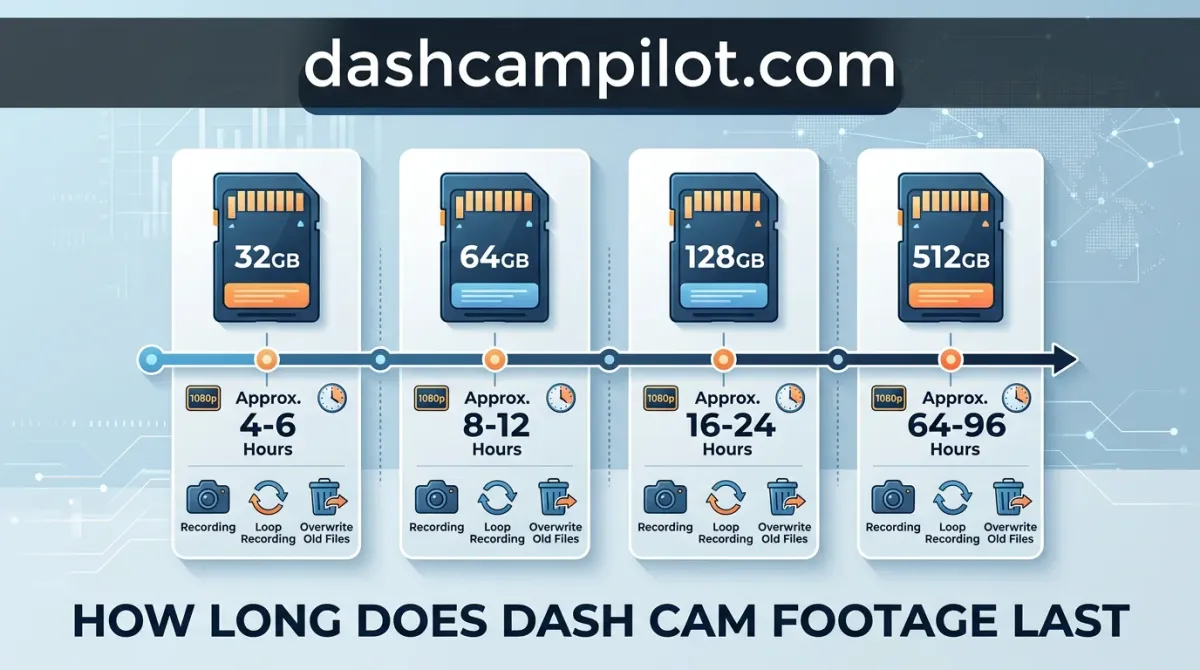
When an unexpected incident occurs on the road, every second of recorded video matters. On average, standard dash cam footage lasts between 2 and 40 hours of total drive time before being erased. For a typical driver using a 32GB card at 1080p resolution, older video usually disappears after roughly four hours of continuous driving.
That retention window changes significantly depending on your memory card capacity, camera resolution, and whether an incident triggered emergency file locking. Below, find exact recording time estimates across all common storage sizes, clear explanations of loop overwriting, and steps to keep crucial evidence safe from deletion.
How Long Does Dash Cam Footage Last? Quick Summary and Overview
Most dash cams store between 2 and 40 driving hours of continuous video before recycling storage space. Exact capacity depends on the microSD card size, video recording resolution, and total camera channel count.

Dash cams do not store footage indefinitely by default. Instead, they rely on continuous loop recording, which automatically overwrites the oldest unprotected video files once the storage card reaches full capacity.
As a baseline benchmark, a typical single-channel 1080p dash cam using a standard 64GB card holds roughly 7 to 10 driving hours of active footage before rewriting starts.
Driving Hours vs. Calendar Days
Because dash cams primarily record while a vehicle runs, storage capacity is strictly calculated in operational driving hours rather than calendar days. Your daily time behind the wheel directly dictates your calendar history.

For example, a commuter driving 1 hour per day with a single 1080p camera and a 64GB card will retain approximately 7 to 10 days of driving history. In contrast, an Uber driver working 8-hour daily shifts will overwrite the exact same card in roughly one day.
Footage Retention Time vs. MicroSD Card Lifespan
Confusing footage retention time with microSD card lifespan is a common pitfall. These two metrics represent entirely different technical functions of your vehicle's camera setup.
Footage retention time refers to the temporary duration—measured in active recording hours—that an individual video file remains saved on the drive before getting overwritten by newly captured footage.
MicroSD card lifespan refers to the physical flash memory endurance. This is measured in months or years, determined by how many total program-erase (P/E) write cycles the internal flash memory cells can survive before degrading permanently.
Loop Recording Details: How Dash Cams Overwrite Video Files
The loop recording engine is the core firmware mechanism that allows dash cams to capture driving events autonomously. Instead of generating a single continuous file, the system divides incoming video into standardized, sequential containers while maintaining an active recording buffer.
Why Dash Cams Split Footage Into 1 to 5 Minute Segments
Standard video clip segments range from 1 to 5 minutes based on firmware user settings. Segmenting footage minimizes file corruption risks. If a vehicle collision disrupts power, only the single active clip risks corruption rather than an entire multi-hour journey.
A dash cam configured to 3-minute clips generates roughly twenty individual MP4 or MOV files per hour of driving. File systems such as FAT32 and exFAT handle this seamless flow by utilizing internal caching buffers. The camera writes to a secondary memory buffer milliseconds before closing the prior container, preventing dropped frames between sequential clips.
Consumer recovery tools only work when file index markers are erased while raw data remains untouched. Dash cam loop recording directly replaces raw storage blocks with live video, making post-overwrite recovery impossible.
Why Overwritten Dash Cam Video Cannot Be Recovered
When storage capacity is reached, the camera firmware initiates its overwrite sequence. The processor scans the file allocation table, identifies the oldest unlocked timestamped file, and replaces it. For example, when capacity is reached, file 001 is deleted to make room for file 021.
Once footage is overwritten by new video, it is overwritten at the physical block level and is virtually impossible to recover via standard recovery software. Commercial recovery programs rely on restoring metadata pointers where underlying payload data remains intact on storage platters.
In flash-based microSD media, incoming video streams physically flash new electrical charges into NAND gate cells. Because new sensor data immediately occupies those physical storage clusters, the original binary data is obliterated in real time without leaving recoverable traces.
How Long Dash Cam Footage Lasts by SD Card Size and Resolution
Card Capacity vs. Video Duration Reference Guide
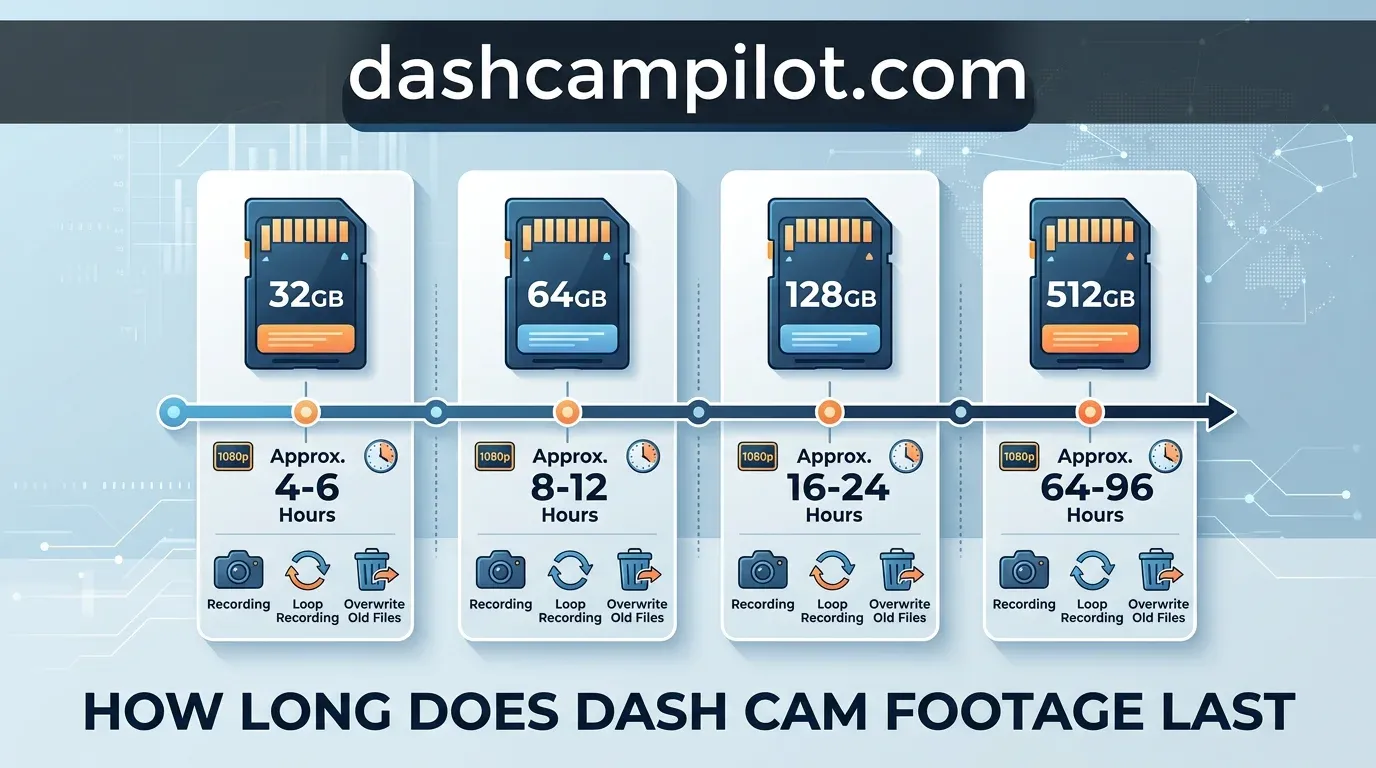
The total duration of video stored on a memory card depends directly on capacity, camera resolution, and the number of active video streams. Lower resolutions preserve longer timelines, while higher resolutions prioritize clarity over historical storage depth.
How to Read This Chart
This chart outlines the continuous recording duration available before loop overwriting begins. The first column lists usable MicroSD storage capacities formatted in gigabytes (GB). The subsequent columns represent common camera setups, displaying total retention capacity expressed in operating hours.
Values are provided in ranges because actual recording duration shifts based on bitrate and video encoding codecs (H.264 versus H.265). Higher ranges reflect devices utilizing aggressive H.265 compression, while lower ranges reflect high-bitrate cameras designed for maximum image clarity. Check your device manufacturer's bitrate specifications to determine where your dash cam sits within these estimates.
Single-Channel (Front Only) Retention Times
Single-camera dash cams capture video through a single sensor, making storage consumption predictable. The baseline data footprint for standard 1080p Full HD at 30 frames per second uses 80 to 150 MB per minute, depending on the camera's processing efficiency.
Upgrading to single-channel 4K Ultra HD significantly multiplies storage consumption. Because a 4K image contains four times the pixel volume of 1080p, the data footprint climbs to 200 to 450 MB per minute.
This heavier data stream directly compresses the time window available before older clips are overwritten. While a 64GB card holds up to 10 hours of standard 1080p video, 4K resolution cuts that retention timeline down to roughly 2.5 to 4 hours.
Dual-Channel (Front and Rear) Storage Consumption
Installing a dual-channel dash cam creates a noticeable storage penalty. Adding a secondary rear camera requires the unit to encode two separate video files simultaneously, cutting overall retention time significantly.
Because the secondary camera typically captures 1080p alongside the primary front 4K feed, total bandwidth demand spikes. Due to this high write rate, a 4K dual-channel setup may fill a 64GB card in under 3 hours.
For example, a 128GB card holds approximately 16-20 hours of 1080p 1-channel footage, but only 4.5-6 hours of 4K dual-channel footage before cycling. Drivers using dual cameras must choose larger cards to preserve full-day driving logs.
Key Technical Factors That Dictate Dash Cam Recording Duration
Video Bitrate and Codec Efficiency: H.264 vs. H.265
Video bitrate, measured in megabits per second (Mbps), dictates both image clarity and the rate of memory consumption. A higher bitrate captures finer motion details like distant license plates, but it fills storage space significantly faster.
Compression codecs determine how efficiently that data is packed onto the card. Modern H.265 (HEVC) compression offers approximately 20% to 40% better compression efficiency compared to older H.264 (AVC) encoding while maintaining identical visual quality.
For example, at a 25 Mbps bitrate, one hour of 4K video consumes ~11.25 GB in H.264. In contrast, H.265 can retain the same visual fidelity at ~16 Mbps, consuming only ~7.2 GB per hour.
The Multi-Channel Penalty: Adding Rear and Cabin Cameras
Expanding your setup beyond a single front-facing unit introduces a substantial storage penalty. Adding a rear or cabin camera doubles the active video streams and cuts card retention duration almost precisely in half.
Dual-channel dash cams must simultaneously encode and write two independent video files to the same card. Overlooking multi-channel cameras cuts footage retention time roughly in half, requiring users to upgrade card capacity to maintain historical coverage.
Parking Mode Storage Consumption
How a dash cam monitors your stationary vehicle directly controls how much storage is consumed while parked. Different parking surveillance presets manage storage drain in distinct ways.
Motion-activated parking mode conserves the most space by writing files only when visual motion or g-force impacts trigger an event. Stationary periods generate zero data, keeping the storage buffer clear.
Low-bitrate continuous mode records non-stop at a drastically reduced bitrate to save space, but it still consumes storage steadily. Time-lapse mode provides a balanced alternative, recording continuous footage at 1 to 5 frames per second to condense hours of surveillance into small, compact video files.
How Long Does Locked Dash Cam Footage Last After an Accident?
How the G-Sensor Shields Collision Files
Most modern dash cams feature an internal G-sensor (accelerometer) calibrated to detect abrupt physical disturbances, such as emergency braking, sudden swerves, or direct collision impacts. When triggered, the sensor immediately flags the active video segment as an emergency event.
Files locked by the G-sensor during an impact are shielded from normal loop deletion and stored in a designated protected folder. The camera assigns these clips read-only attributes, isolating them from standard storage cycles so normal driving does not overwrite them.
Event Partition Limits: Can Locked Files Be Overwritten?
Protected clips do not have unlimited space. Many dash cams allocate a fixed percentage (e.g., 20-30%) of the card to locked files. This division prevents emergency files from consuming the entire card and halting routine video capture.
However, if that dedicated partition reaches capacity—often due to cumulative speed bumps, rough roads, or pothole impacts—newer locks may fail or begin overwriting older locked events. Unchecked accumulated event files can cause the camera to discard fresh accident footage without warning.
The Danger of Driving After an Unlocked Incident
Continuous driving after an accident can push the critical incident footage out of the loop buffer if the G-sensor was not triggered. Low-impact collisions often lack the force required to activate automatic security protocols.
For example, a minor bumper scrape or pothole swerve might fail to trip a low-sensitivity G-sensor; continuing to drive for 4 hours afterward can push that scrape off a 32GB card permanently. Leaving the vehicle idling at the scene while waiting for police can cause the exact same data loss.
Never assume the G-sensor registered an impact. Following any collision, press the manual lock button immediately, or unplug the power cable from the dash cam to halt loop recording entirely.
Cloud Storage vs. MicroSD Cards: Retention Time Facts
MicroSD card retention is measured strictly in cumulative driving hours before an overwrite occurs. In contrast, cloud storage operates on calendar expiration windows, preserving files for fixed calendar durations regardless of vehicle operation time.
While an active driver might cycle through local card capacity in three days, cloud backups stay locked to predetermined timelines. Understanding how these systems handle storage lifecycles ensures critical evidence remains accessible when needed.
Cloud Retention Windows (7 to 30 Days)
A cloud retention window typically spans 7 to 30 days, determined by your specific subscription tier and service provider. Typical cloud service plans maintain uploaded incident video clips for 7 to 30 days before scheduled automated deletion purges the files.
Unlike local memory cards that cycle continuously as you drive, cloud servers preserve files independent of vehicle usage. However, after the designated 7-to-30-day window expires, unarchived clips are permanently deleted from the remote server.
For example, if a vehicle is hit while parked, a cloud dash cam uploads a 20-second 1080p clip over LTE to the server. That clip remains accessible for 30 days, even if a thief steals the physical dash cam.
Bandwidth Constraints: Event Clips vs. Full Loop Backup
Cloud cameras do not upload 100% of continuous driving video due to LTE bandwidth limits and power consumption. Full driving loops remain on the internal card, while only triggered event clips and manual bookmarks transfer over cellular networks.
Local memory cards record high-bitrate video, whereas uploaded cloud clips are often optimized to save bandwidth. Relying solely on remote storage leaves ordinary non-incident footage unbacked, making dual-path configurations critical for complete protection.
A hybrid reliability model provides the strongest defense. Pairing local High Endurance cards alongside cloud synchronization guarantees immediate local fidelity plus remote security against camera theft, card corruption, or severe crash damage.
How to Read the Storage Comparison Table
The comparative data table contrasts physical flash media with cloud repository architectures across four essential operational parameters: Retention Metric, Footage Coverage, Hardware Theft Immunity, and Typical Upload Latency.
Retention units differ fundamentally between mediums. MicroSD media depends strictly on active operational run-time, meaning non-driving parked periods consume no retention overhead unless parking modes activate. Cloud metrics run exclusively on elapsed solar calendar days, progressing identically whether the vehicle travels 1,000 miles or stays parked in a garage.
Cellular latency figures represent variable environments and require manual verification based on local network carrier infrastructure, signal attenuation inside vehicles, and carrier-specific uplink bandwidth allocations.
Critical Guide to Prevent Dash Cam Footage From Being Overwritten
Loop recording protects your storage capacity, but it can permanently erase critical crash evidence if not actively managed. Follow these operational safeguards to guarantee vital incident recordings remain intact.
Post-Accident Action Protocol: Freezing the Loop
Disconnect power at the 12V adapter or hardwire kit once safe. Failing to immediately turn off or eject the memory card after a minor collision causes the return drive or idling vehicle to overwrite the incident.
Remove the card as soon as the camera shuts down. Removing the physical card freezes the storage state and ensures background camera processes cannot overwrite protected blocks during transit.
Set your camera's G-sensor to medium sensitivity. Excessive sensitivity causes harmless road bumps and potholes to rapidly fill the emergency locked folder, blocking legitimate accident clips from being saved.
Why High Endurance MicroSD Cards Are Essential
Dash cams generate continuous data streams that overwhelm standard consumer flash memory. Relying on standard smartphone MicroSD cards crashes under heavy continuous video write cycles and leads to silent recording failures.
Always install high endurance media built with MLC or TLC wear leveling. For example, using a SanDisk High Endurance or Samsung PRO Endurance card rated for 20,000+ write hours instead of an entry-level smartphone card that degrades within 3 to 6 months of continuous use protects your system against sudden memory corruption.
Routine In-Camera Formatting and Maintenance
Forgetting to format the MicroSD card periodically leads to file fragmentation and 'card full' write errors. Over time, recurring locked event files and split loops scatter data sectors across the card, preventing new recording cycles.
Format the card inside your dash cam every 4 to 6 weeks. Formatting in-camera restores clean FAT32 or exFAT file allocation tables, purges non-critical locked files, and prevents unpredictable recording freeze-ups.
- ✓ Continuous recording capacity ranges from roughly 2.5 hours on a 32GB card at 4K to over 40 hours on a 256GB card at 1080p.
- ✓ Loop recording automatically overwrites the oldest unlocked files once storage is full, ensuring continuous uninterrupted operation.
- ✓ G-sensor event triggers isolate and write emergency collision files into a dedicated locked folder protected from automatic deletion.
- ✓ Higher recording resolutions like 4K UHD consume up to four times more data storage per minute than standard 1080p Full HD.
- ✓ Cloud-connected dash cams offer offsite storage retention periods typically spanning 7 to 30 days depending on the subscription tier.
❓ Frequently Asked Questions
1 How many hours of driving can a 128GB dash cam hold?
A 128GB memory card typically holds between 8 and 10 hours of dual-channel 1080p video, or about 5 to 6 hours of single-channel 4K footage. Precise storage details depend on file compression codecs like H.264 versus H.265, bitrates, and audio recording settings.
2 Does dash cam footage delete itself automatically?
Yes, standard dash cams use loop recording to replace the oldest unprotected video files once the storage card fills up. However, essential emergency footage locked by your G-sensor or saved manually will not be overwritten, remaining stored safely until you manually delete or format the card.
3 How long do dash cams hold footage after an accident?
Accident footage saved to a locked folder lasts indefinitely on your SD card until manually erased. However, key safety facts show that if the locked partition fills completely, some budget dash cams may fail to log new events or overwrite old emergency files without warning.
4 How does resolution affect dash cam storage duration?
Recording resolution directly dictates file size. Full HD 1080p footage uses roughly 100MB to 150MB per minute, whereas 4K video consumes up to 300MB to 450MB per minute. Upgrading resolution without increasing card capacity significantly reduces how many hours of driving information you can retain.
5 How long does dash cam cloud storage keep video files?
Most cloud dash cam subscriptions store event uploads for 7 to 30 days before automatic deletion. Free cloud tiers often cap retention at 24 to 72 hours, meaning you must export critical incident files immediately to retain permanent archival information for insurance or legal claims.
6 How long does a 64GB or 128GB card hold dash cam footage?
Detail that a 64GB card typically holds 7-10 hours of single 1080p footage or 2.5-3.5 hours of dual-channel 4K video. A 128GB card holds roughly 16-20 hours of 1080p or 5-7 hours of dual 4K video before overwriting begins.