
How Does Dash Cam Work When Car Is Off: Wiring & Modes
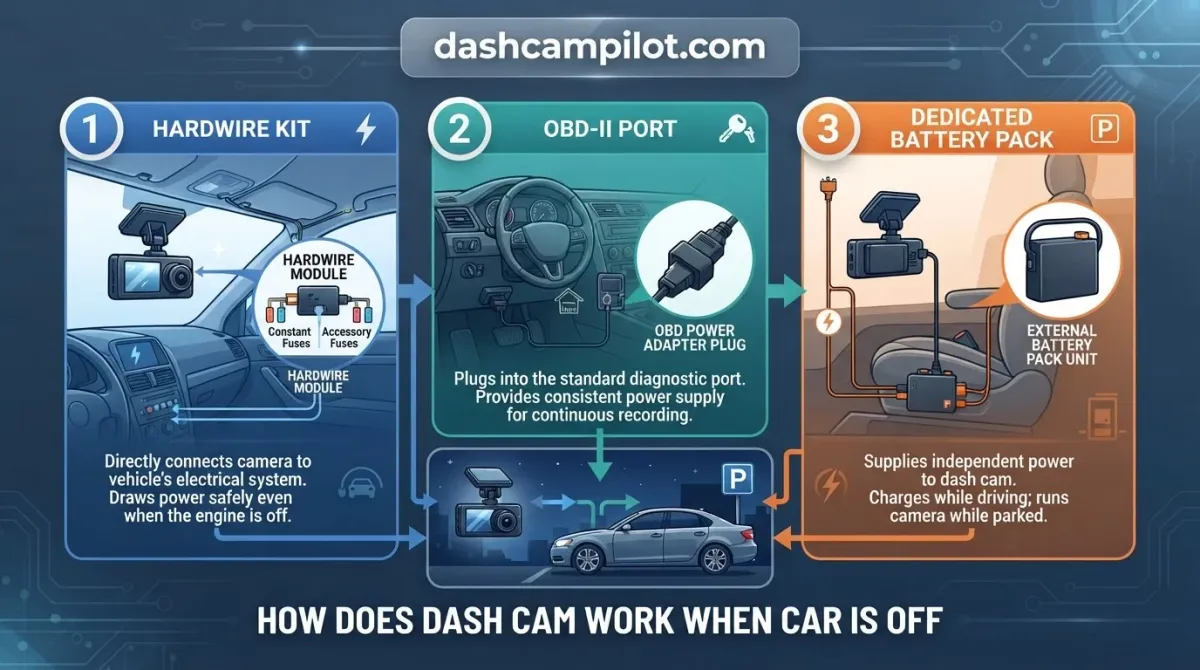
Your vehicle’s ignition is usually the power switch for your dash cam, but parking incidents often happen when you aren't around. To capture footage while your car is off, the camera must bypass the ignition circuit to draw a continuous electrical current. This allows the device to remain active, monitoring for motion or impacts even when the engine is idle.
In this article, we explore the mechanics behind parking mode, how to supply consistent power safely, and the steps required to troubleshoot common connectivity issues, ensuring your vehicle remains protected at all times.
Why Dash Cams Stop Working When the Car Is Off
Most drivers expect their dash camera to work like an action camera or smartphone, capturing footage continuously on its own power. In reality, standard vehicle setups cut power as soon as the trip ends, causing the device to power down immediately.
Switched 12V Accessory Sockets vs Constant Power
The primary reason a dash cam powers off is the design of the vehicle's electrical circuit. In most modern vehicles, the 12V accessory port—commonly called the cigarette lighter socket—is wired as a switched circuit. Power flows to this socket only when the ignition key rests in the "ACC" (Accessory) or "ON" position.

The moment you switch off the ignition, the vehicle's electrical relay opens, and the socket's output drops from 12V to 0V instantly. For example, when you park, turn off the engine, and remove the key, you will often see the dash cam display shut down within three seconds because its external power feed has vanished.
Because the factory 12V port disconnects entirely, passive continuous recording or parking surveillance cannot function through a basic plug-and-play setup without an uninterrupted, continuous external power delivery system.
The True Role of Internal Supercapacitors and Small Batteries
A common misconception is that a dash cam will switch over to an internal battery to record while parked. Dash cams do not run on internal power long-term. Unlike mobile devices, they are designed as stationary automotive hardware that depends entirely on vehicle-supplied electricity.
Instead of large energy cells, modern units use tiny lithium batteries (often under 300mAh) or, more reliably, internal supercapacitors. These components do not power active recording. They hold just enough charge—typically between 5 and 15 seconds of reserve power—to safely close the current recording loop, finalize the video file, and prevent micro-SD card corruption during shutdown.
How Does a Dash Cam Work When Car Is Off? Core Mechanics
Operating a dash cam after parking requires specialized internal logic and dual-circuit electrical routing. Instead of shutting down completely when the key is removed, the device alters its hardware state to function as a low-power sentry.
The Role of the 3-Wire Hardwire Kit
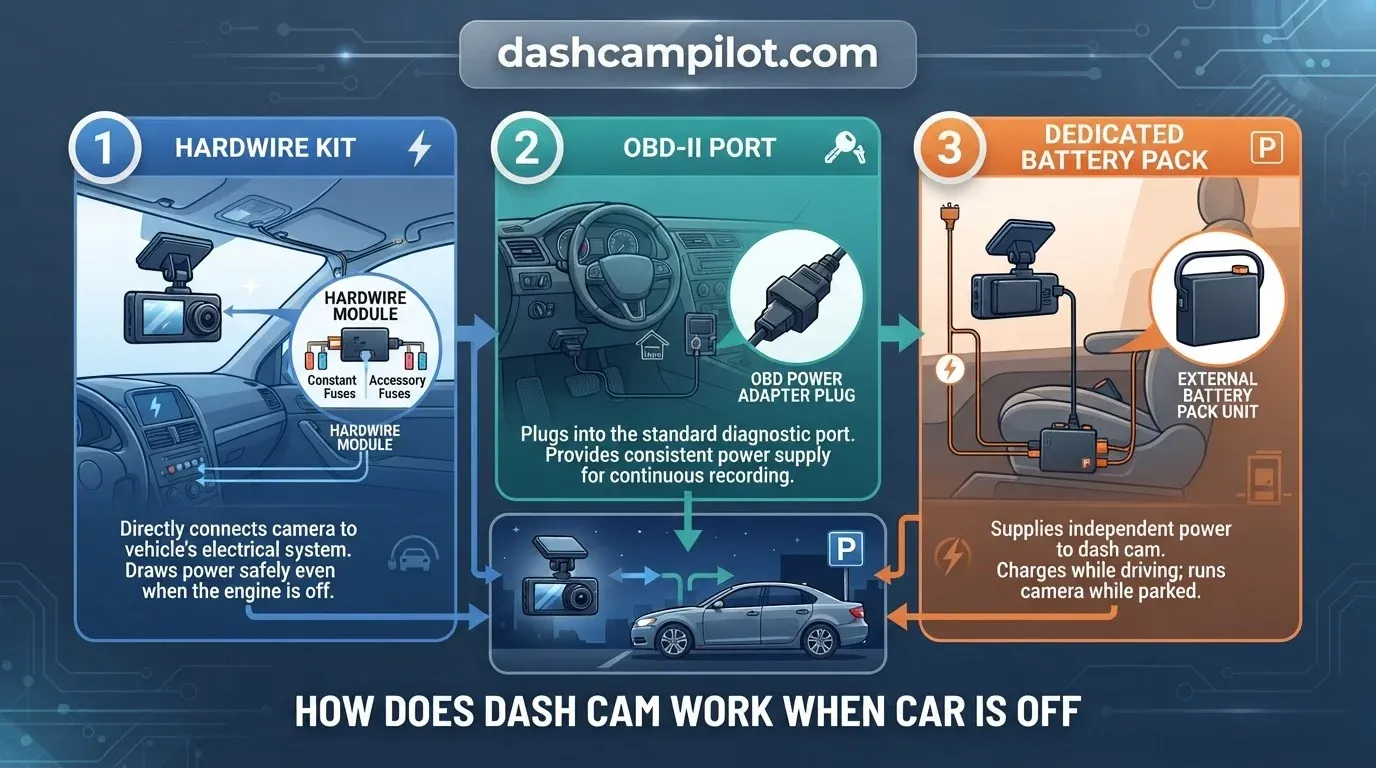
Standard 12V auxiliary sockets cut power immediately when the vehicle shuts off. To bypass this, surveillance-capable setups rely on a 3-wire hardwire kit connected straight to the vehicle fuse box.
This kit splits electrical duties across three dedicated leads: a constant battery wire (BATT), an accessory switched wire (ACC), and an unpainted chassis ground wire. The BATT wire delivers continuous 12V current directly from the vehicle battery at all times.
Meanwhile, the ACC wire links to a circuit that energizes only when the ignition is switched on. By running both circuits simultaneously, the hardwire kit delivers steady operating current while feeding real-time vehicle power status directly to the camera.
Idle power consumption in standby typically ranges between 150 and 400 mA. The exact draw varies based on the number of camera channels and whether radar, optical motion, or G-sensor detection is active.
How the Dash Cam Senses the Engine Is Off
The transition between drive mode and park surveillance is managed by the camera processor monitoring the ACC circuit. When you turn off the vehicle, the accessory wire experiences an immediate voltage drop to zero.
This voltage collapse signals the camera microprocessor to save the active driving file. For example, the ignition wire dropping voltage prompts the camera firmware to announce "Entering parking recording mode" within 10 seconds.
Once triggered, internal logic de-energizes high-draw components like the LCD screen, Wi-Fi modules, and secondary processors. The device reduces sensor draw and enters a low-power standby state, keeping only the G-sensor or optical sensors armed for vibration and impact triggers.
Dash Cam Recording Modes When the Car Is Turned Off
Parking modes balance surveillance completeness against vehicle battery conservation. Selecting a mode dictates how internal hardware responds to environmental triggers and determines how much electrical current the camera draws while parked.
Impact-Only G-Sensor Sleep Mode
In impact-only detection, the camera remains dormant in an ultra-low-power state. The image sensor and processor stay unpowered until the integrated tri-axial G-sensor detects a physical disturbance, such as a collision or forced entry attempt.
Once triggered by kinetic force, the camera wakes up, boots the system, and writes a protected file to the memory card. While this passive method maximizes battery longevity, it cannot record the visual context preceding the collision.
Buffered Motion Detection vs Passive Motion
Buffered motion detection keeps the camera sensor and volatile memory continuously energized, capturing footage to a temporary cache. Because the visual processor never sleeps, buffered recording consumes significantly more energy than passive G-sensor sleep mode.
When software detects movement or a physical impact, the temporary cache permanently commits to storage. This preserves a pre-buffer duration of 5 - 15 seconds alongside the post-event footage.
This pre-incident buffer is critical for incident liability. For example, a buffered camera can record the license plate of a reversing truck 10 seconds before it strikes the bumper, whereas a non-buffered setup only records after contact occurs.
Passive motion, by contrast, only activates hardware after motion or impact crosses a set threshold. Without pre-buffered memory, passive units often miss the initial moments of vandalism or fast-moving hit-and-run vehicles.
Time-Lapse Parking Mode
Time-lapse parking mode keeps the optical sensor active but reduces the frame rate. Instead of standard 30 frames per second (fps), the unit operates at a time-lapse frame rate of 1 - 5 fps.
The unit combines these individual frames into a silent, accelerated video file. Continuously shooting at 1 to 5 frames per second preserves battery life compared to standard video while substantially maximizing microSD storage efficiency.
Low-Power Radar and Microwave Detection
Ultra-low-power radar detection wakes the unit when an approaching mass enters proximity. High-frequency millimeter-wave sensors scan the vehicle perimeter while the processor and primary image sensor stay in standby.
When an object breaches the detection field, the radar module signals the camera processor to initialize recording. This mechanism delivers standby current efficiency close to impact sleep mode while securing active visual coverage before impact occurs.
How to Read the Parking Mode Comparison
This technical comparison evaluates parking surveillance modes by operational current drain and evidentiary coverage. Standby power draw is expressed in milliamps (mA), representing steady-state current pulled from the electrical system during monitoring.
Modes operating above 200 mA require robust low-voltage cut-off settings to avoid premature battery drain. Conversely, ultra-low modes running below 30 mA allow multi-day surveillance windows without taxing vehicle reserves.
Lead-up capture window refers to the hardware's capability to retain visual frames immediately prior to physical contact or sensor triggers. Storage consumption rate describes the volume of data written over a 24-hour cycle.
Real-world metrics vary based on hardware architecture, ambient outdoor temperatures, and multi-channel configurations. Dual-channel or triple-channel systems will exhibit higher continuous current draws. Verify exact manufacturer hardware specifications for individual camera models.
Easy Steps to Wire a Dash Cam for Operation When the Car Is Off
Installing a three-wire hardwire kit directly into your vehicle fuse block enables continuous surveillance without draining the starter battery. Follow this step-by-step procedure to connect constant, switched, and ground circuits safely.
Step 1: Locate Safe Switched and Constant Fuses
Access your cabin fuse box, usually located underneath the driver dashboard. Ground your 12V circuit tester or multimeter against unpainted metal, then test fuse contacts while the engine is off to find an unswitched circuit. A common choice is the interior dome light fuse for constant BATT power.
Next, switch the ignition to "ACC" or "ON" and locate a fuse that only powers up when the key is turned. A dependable example is using the windshield wiper fuse for ACC power.
Tapping into safety-critical fuses (e.g., airbags, ABS, engine control module) when installing a hardwire kit must be avoided to prevent system faults or delayed safety deployments.
Step 2: Connect the Add-a-Fuse Taps and Ground Wire
Crimp the hardwire kit’s accessory wire (typically red) and constant wire (typically yellow) into separate add-a-fuse taps. Insert the car's factory fuse into the lower slot of the tap, and seat a low-amperage fuse (2A to 5A) into the upper slot reserved for the dash cam.
Firmly press the assembled taps into the designated fuse panel slots. Orient each tap so the hot side of the fuse terminal feeds directly into the tap's base pin.
Find a factory ground bolt anchored into unpainted steel near the panel. Loosen the bolt with a socket wrench, slip the black ground wire's C-terminal underneath against the bare chassis metal, and torque the bolt down firmly.
Step 3: Set Voltage Cutoff Switches and Test Ignition Switching
Inspect the hardwire kit's inline regulator box and configure cutoff voltages using the physical dip switches. Select 12.0V or 12.2V to prevent excessive resting discharge on 12-volt lead-acid batteries.
Start the car engine to ensure the camera boots into standard recording mode. Then shut the vehicle off and remove the key to verify the camera smoothly transitions into low-power parking surveillance.
After testing, route cables neatly behind interior trim and A-pillar weatherstripping using a plastic pry tool, routing behind side-curtain airbags down to the fuse compartment.
Beginner-Friendly Methods to Power Dash Cams When Parked
If tapping into the fuse box is impractical, prohibited by a vehicle warranty, or restricted by a lease agreement, plug-and-play hardware offers continuous parking surveillance without complex wiring. These non-invasive options require zero wire splicing or panel disassembly.
OBD-II Port Power Adapters
OBD-II power cables plug directly into the standardized onboard diagnostics port located beneath the steering wheel. These specialized cables provide constant 12V power alongside automatic switch detection, instantly signaling the dash cam to enter parking mode when the ignition turns off.
Because they pull power directly from the diagnostic port, installation takes under two minutes without pulling fuses. Most OBD-II adapters feature a physical toggle switch on the plug casing, allowing drivers to alternate between 24/7 parking surveillance and driving-only recording modes.
Dedicated LiFePO4 External Battery Packs
Dedicated Lithium Iron Phosphate (LiFePO4) dash cam battery packs recharge via a standard accessory socket while driving and fully isolate the vehicle starter battery. Because the camera draws reserve power exclusively from this secondary unit when parked, starter battery degradation is completely avoided.
Depending on camera power draw, typical 4,000 to 10,000+ mAh packs yield an external battery pack operating time of 15 to 40 hours. For example, a 7500mAh LiFePO4 dash cam battery pack installed under the passenger seat provides roughly 25 hours of dual-channel buffered recording.
Standalone packs are also far more power-efficient than vehicle-native solutions. Factory integrated sentry systems (e.g., Tesla) keep heavy vehicle computers active, drawing significantly more power from main vehicle packs than isolated 12V dash cam systems operating on dedicated LiFePO4 cells.
How to Keep a Dash Cam Working Without Draining Your Car Battery
Selecting the Correct Low-Voltage Cutoff Threshold
Low-voltage cutoff switches prevent the car battery from dropping past critical cranking thresholds. Most parking-mode hardwire kits offer an adjustable low-voltage cutoff threshold between 11.6V and 12.4V. Once the battery drops to the selected limit, the switch disconnects power to stop parasitic draw.
Without a low-voltage cutoff mechanism, leaving a dash cam powered continuously will discharge the vehicle starter battery to a dead state.
Winter Temperature Impact on Parking Duration
Cold ambient temperatures depress 12V battery chemical efficiency. Because cold weather reduces car battery capacity, your low-voltage cutoff thresholds trip significantly earlier than in warm weather, reducing overall recording time.
Adjust your cutoff voltage upward as seasons change. For instance, setting cutoff to 12.2V instead of 11.8V during freezing winter temperatures will guarantee a reliable morning engine crank despite lower resting capacity.
Why High-Endurance MicroSD Cards Are Essential
Continuous overwriting rapidly degrades standard memory cards. Typical consumer cards are built for intermittent writes and quickly experience sector failures under the round-the-clock write cycles of parking monitoring.
High-endurance flash memory uses specialized NAND architecture engineered for heavy write loads. These cards resist thermal stress inside a parked cabin and prevent corrupted video files during critical security incidents.
Why Your Dash Cam Won't Work When the Car Is Off: Fixes
Swapped ACC and BATT Fuse Lines
Reversing the Accessory (ACC) and Battery (BATT) lines is a frequent installation error. Swapped connections cause instant camera shutdown the moment the ignition turns off, or they trigger infinite active recording that prevents the camera from entering parking mode.
Resolve this issue by re-testing your fuse taps with a multimeter while the car is off. The constant 12V line must hold continuous power, while the ACC tap must drop to zero volts. Additionally, verify the ground terminal sits flush against bare chassis metal, as improper ground connections cause intermittent reboots and failed event storage.
Camera Shuts Down After Only a Few Minutes
If surveillance terminates prematurely, an aging vehicle starter battery is usually responsible. Under load, a depleted battery's resting voltage drops quickly, which trips the hardwire kit's low-voltage cutoff switch within minutes to preserve starter power.
Avoid setting the voltage cutoff threshold too low (e.g., below 11.8V on a standard vehicle), which may prevent the engine from cranking in winter. Conversely, leaving a dash cam plugged into an "always-on" cigarette lighter socket without voltage protection will drain the vehicle flat.
G-Sensor Sensitivity Calibration Tips
Incorrect G-sensor sensitivity settings lead to false triggers or missed parking taps. Setting parking sensitivity too high causes passing traffic or heavy gusts of wind to trip the sensor, quickly filling memory reserves with false emergency recordings.
Reduce the parking impact threshold to a medium setting to filter out ambient vibrations. Test the sensor by bumping the tire or tapping the trunk frame to ensure minor hit-and-run collisions activate the camera properly.
- ✓ Standard 12V cigarette lighter sockets shut down with the ignition, requiring an alternative continuous power method for parked recording.
- ✓ Parking mode activates power-saving states like optical motion detection, G-force impact triggers, or continuous low-bitrate time-lapse.
- ✓ Hardwiring to the vehicle fuse box using an add-a-fuse tap provides a reliable technique for seamless switching between driving and parked surveillance.
- ✓ Low-voltage cutoff switches protect your vehicle battery by terminating power if voltage drops below safe starting thresholds between 11.8V and 12.4V.
- ✓ Dedicated LiFePO4 dash cam battery packs eliminate vehicle starter battery drain entirely during extended multi-day parking surveillance.
❓ Frequently Asked Questions
1 What is parking mode on a dash cam?
Parking mode is a power-saving surveillance feature that monitors your vehicle while parked. When the engine shuts off, the camera enters a low-power standby state, recording only when onboard sensors detect physical impacts, radar movement, or optical motion, conserving storage space and vehicle battery life.
2 Will keeping a dash cam on drain my car battery?
It can drain your battery if wired incorrectly. However, modern dash cam hardwire kits feature built-in voltage cutoff switches that automatically cut power when vehicle battery levels drop to 11.8V–12.4V. This safeguards sufficient charge to start the engine, eliminating unexpected dead-battery incidents.
3 How do you wire a dash cam to stay on when parked?
You wire a dash cam using a three-wire hardwire kit connected to your fuse box. The accessory wire connects to a switched fuse, the constant wire taps into an unswitched circuit, and the ground attaches to bare chassis metal, enabling automated switching between driving and parking modes.
4 What is the easiest method to power a parked dash cam?
The easiest method is an OBD-II power cable. It plugs directly into your car's diagnostic port, delivering continuous power and ignition detection without requiring fuse box tapping. Most quality OBD cables feature plug-and-play installation and built-in low-voltage cutoffs for immediate parked surveillance.
5 Why won't my dash cam turn on when the car is off?
Your dash cam likely lacks a constant power source or has tripped its low-voltage protection limit. Verify that your hardwire kit is tapped into an unswitched fuse, check ground connection tightness, and ensure your vehicle battery voltage sits safely above the hardwire kit's shutoff threshold.
6 Will a dash cam drain my car battery when parked?
Explain that an unprotected dash cam plugged into an always-on outlet will drain the battery flat, but a hardwire kit with a calibrated low-voltage cutoff switch (LVC) automatically severs power before the car battery drops below cranking voltage.