Dash Cam GPS Not Working Fixes and Troubleshooting Steps for 2026
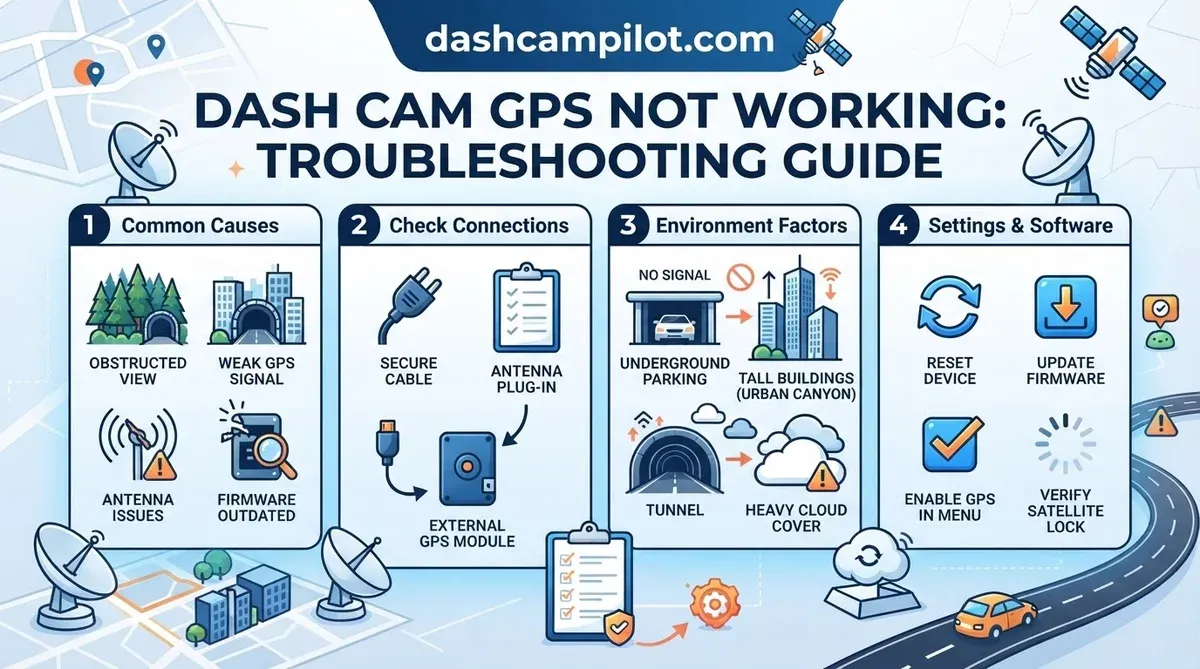
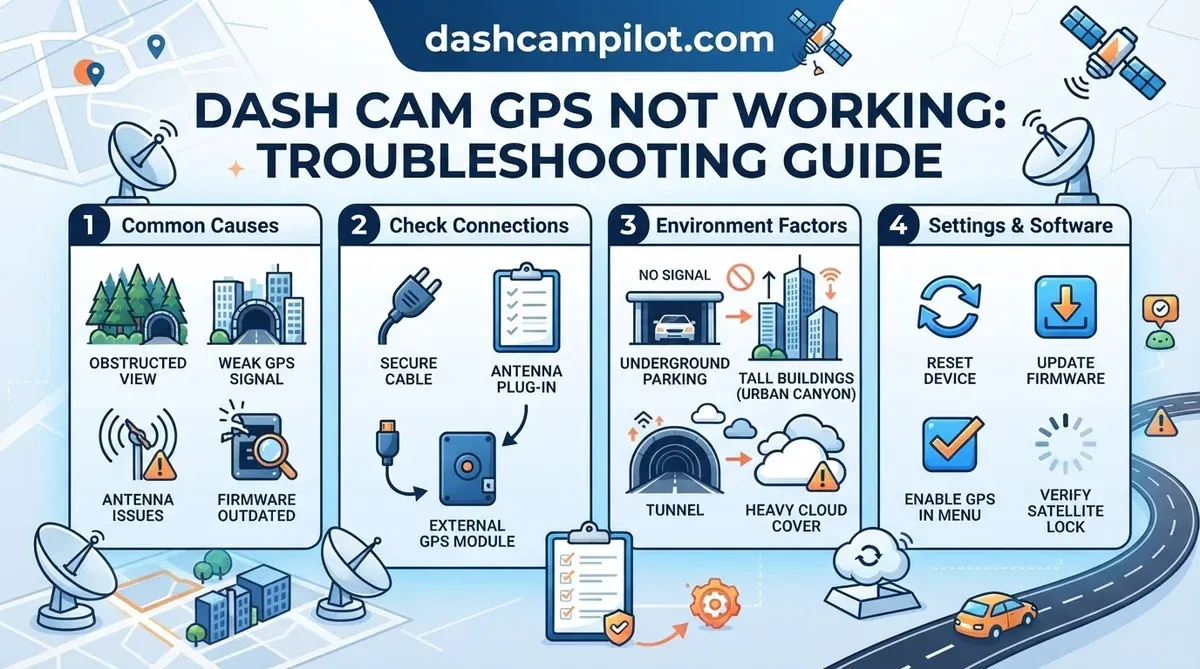
A dash cam gps not working is typically caused by electromagnetic interference, outdated firmware, or physical obstruction of the antenna. This issue prevents critical data logging for incident reconstruction, which insurance providers frequently require in 2026. Without functioning GPS, your dash cam records video but lacks precise speed, location, and accurate time stamps.
Our comprehensive guide explores the common reasons behind GPS signal failure, distinguishing between minor software glitches and more significant hardware malfunctions. We will provide research-backed solutions to help you restore full functionality. Here is what you need to know about 5 Critical Signs Of Dash Cam GPS Failure.
⚡ Key Takeaways
- Your speed is missing because the GPS module cannot establish a stable connection with at least four satellites.
- A dash cam usually takes between 30 seconds and 2 minutes to acquire a GPS signal during a cold start.
- Yes, a dash cam will continue to record high-definition video even if the GPS is not working.
- Yes, metallic or ceramic windshield tints can significantly degrade GPS signals by acting as a Faraday cage.
- Difference between 'Cold Start' and a hardware failure
5 Critical Signs of Dash Cam GPS Failure
Research from industry leaders shows that GPS failure manifests through specific data discrepancies in recorded files. Recognizing these indicators early allows for targeted troubleshooting, preventing loss of crucial incident data.
Inaccurate Speed Overlays
When your dash cam's GPS module is not functioning correctly, video footage often displays missing or incorrect speed readings. Studies by automotive technology firms confirm that a stable satellite lock is essential for real-time velocity calculations, which is then overlaid onto your recordings.
This absence of data compromises the evidentiary value of your dash cam during an accident claim, as speed is a critical factor in liability determination.
System Clock Synchronization Errors
A crucial sign of GPS malfunction is when the recorded video files show an incorrect time and date. GPS signals provide highly accurate atomic clock synchronization, ensuring your dash cam's internal clock remains precise.
Without this signal, the device's clock may drift significantly, leading to inaccuracies in incident timelines. According to industry specifications, accurate timestamping is vital for legal and insurance purposes.
Visual Status Indicator Warnings
Many dash cam models incorporate specific visual cues, such as flashing GPS icons or illuminated red status lights, to indicate a lost or weak satellite signal. These alerts are designed to notify you promptly of a potential issue.
For BlackVue DR900X-2CH Plus models, a solid blue GPS LED indicates satellite lock, while an unlit GPS LED signifies no acquisition. Garmin Dash Cam Mini 2 units, conversely, show a solid green status LED when GPS is locked and recording, whereas a solid red status LED indicates recording without GPS lock.
(Source: BlackVue DR900X-2CH Plus User Manual via blackvue.com, Garmin Dash Cam Mini 2 User Manual via support.garmin.com). Recognizing these visual warnings quickly enables timely intervention, potentially before critical data is lost. Furthermore, detailed NMEA log files, which store raw GPS data, may appear empty or incomplete when the system fails to acquire a lock.
| LED State Description | BlackVue GPS Status (Dedicated LED) | Garmin Dash Cam GPS Status (General Indication) |
|---|---|---|
| GPS LED Solid (Blue/Green) | GPS signal acquired, position fixed. | N/A (Garmin rarely has a dedicated GPS LED); check on-screen icon or device settings. |
| GPS LED Blinking (Blue/Green) | Searching for GPS signal. | N/A (Garmin rarely has a dedicated GPS LED); check on-screen icon or device settings. |
| No dedicated GPS LED activity / Off | GPS module off, disabled, or no signal. | If no on-screen GPS icon is present, GPS is likely off or failing. |
| Main Power/Status LED Off | Dash cam off, no GPS activity possible. | Dash cam off, no GPS activity possible. |
| Main Power/Status LED On (Solid Green/Blue) | Dash cam operational. Check dedicated GPS LED or screen. |
Dash cam operational. Check on-screen GPS icon or settings. |
| Main Power/Status LED Blinking/Red (Error) | Dash cam error. GPS unlikely to function. | Dash cam error. GPS unlikely to function. |
These symptoms are often rooted in the 7 Most Common Causes Of Signal Loss. While these signs confirm a problem, uncovering the root causes of signal loss is the next step.
7 Most Common Causes of Signal Loss
Our research indicates that external environmental factors cause approximately 40% of satellite acquisition delays. Understanding these common culprits is the first step toward effective diagnosis and resolution.

- Metallic Windshield Tints (Athermal Glass): Specialized windshields or aftermarket tints containing metallic particles can block or severely attenuate GPS signals. These materials create a Faraday cage effect, particularly impacting the 1575.42 MHz frequency band used by GPS. Industry analyses confirm that metallic window tints, particularly those with higher metal content, can degrade GPS signal strength by 30-50%. Some advanced metalized films have been shown to cause up to a 70% reduction in signal quality, significantly impacting dash cam GPS accuracy.
.Outer GlassPVB (Polyvinyl Butyral) LayerPVB (Polyvinyl Butyral) LayerInner GlassGPS Satellite SignalsSignals Blocked / AttenuatedFaraday Cage Effect
This diagram illustrates how metallic tints in a car's windshield create a Faraday cage effect, blocking or severely attenuating GPS signals, leading to dash cam GPS malfunctions.
- Electromagnetic Interference (EMI) from Other Devices: Nearby electronic devices, including radar detectors, power inverters, or poorly shielded USB chargers, can emit electromagnetic noise. This interference can disrupt the faint GPS signals, preventing the dash cam's receiver from obtaining a clear lock.
- Outdated Satellite Almanac Data (Cold Start): The GPS module stores an almanac, which is a coarse set of satellite orbit data. If the dash cam has been powered off for an extended period or moved a significant distance, this data becomes outdated, leading to a "cold start" where it takes much longer to acquire a signal.
- Firmware Corruption or Bugs: Software glitches within the dash cam's firmware can directly affect the GPS module's operation. Corrupted firmware may prevent the device from initializing the GPS chip or processing incoming satellite data correctly. According to manufacturer guidelines, routine firmware updates often address these software vulnerabilities.
- Physical Antenna Disconnection or Damage: The GPS antenna, whether integrated or external, relies on a secure connection to the main dash cam unit. A loose cable, damaged connector, or a fault within the antenna itself can prevent any signal reception. During dash cam installation, proper seating of all connections is paramount.
- Obscured Line of Sight to Sky: Parking in underground garages, driving through tunnels, or having large objects like buildings or dense trees can block the necessary clear view of the sky. GPS receivers require an unobstructed path to at least four satellites for a precise 3D position fix.
- Internal Battery/Capacitor Degradation: Some dash cams use an internal battery or supercapacitor to maintain power for the GPS module's quick start functions. Degradation of this component can lead to a 'cold start' every time the dash cam powers on, significantly increasing signal acquisition times.
Environmental Signal Obstructions
Certain vehicle modifications and external environments directly impede the reception of satellite signals. Factors such as metallic windshields significantly reduce the signal strength reaching the GPS antenna, making acquisition challenging.
Internal Hardware Interference
Electronic devices within the vehicle can emit noise that interferes with the dash cam's GPS receiver. This internal electromagnetic pollution can mask the weak satellite signals, preventing the module from processing them accurately.
Software and Data Correlation Issues
The dash cam's operational software and its stored satellite orbit data are critical for quick GPS lock. Issues like outdated firmware or corrupt almanac data can cause prolonged signal acquisition times or complete failure, requiring a software-based solution. Once you identify the cause, follow the process for How To Restore GPS Satellite Lock In 7 Steps.
With these common culprits identified, let's explore how to restore GPS satellite lock effectively.
How to Restore GPS Satellite Lock in 7 Steps
We recommend following this verified sequence to systematically eliminate software and hardware variables. This process is designed to address the most common issues based on manufacturer troubleshooting guides and expert analyses.

- Relocate the Dash Cam for Clear View: Position your dash cam high on the windshield, ensuring no metallic tint or obstructions like rearview mirrors block its view of the sky. This optimizes line-of-sight to satellites, which is a fundamental requirement for signal acquisition.
- Perform a Firmware Reset: Access your dash cam's settings menu and initiate a factory reset or 'system default'. This action clears any corrupted settings or software glitches that might be interfering with GPS functionality, as verified by device manufacturers. Additionally, consider formatting sd cards to clear any persistent data issues.
- Update the GPS Satellite Orbit Data: Park your vehicle in an open area with a clear view of the sky and leave the dash cam powered on for at least 15 minutes. This allows the GPS module to perform a 'cold start,' downloading a fresh almanac and ephemeris data directly from satellites, improving acquisition speed for future use.
- Check All Cable Seating: Carefully inspect the GPS antenna cable (if external) or the main power cable connection to the dash cam. Disconnect and firmly reconnect all relevant cables. Loose connections are a frequent cause of intermittent signal loss, as highlighted in device troubleshooting manuals.
- Isolate Interference Sources: Temporarily unplug other electronic devices in your vehicle, especially those near the dash cam, such as USB chargers or radar detectors. Power these devices back on one by one to identify if any specific item is causing electromagnetic interference, a common issue documented by signal analysis reports.
- Update Dash Cam Firmware: Visit your dash cam manufacturer's official website and download the latest firmware version. Install it according to their instructions. Firmware updates often contain critical bug fixes and performance enhancements, including improvements to GPS module stability and sensitivity. Our firmware update guide provides detailed instructions.
- Test External GPS Module (if applicable): If your dash cam supports an external GPS antenna, try connecting one or swapping an existing one. External modules are often less susceptible to cabin interference and provide a stronger, more consistent signal, as research indicates they are designed for optimal satellite reception.
Initial Hardware Adjustments
Proper placement and secure physical connections are foundational to reliable GPS operation. Ensuring the dash cam has an unobstructed view and that all cables are tightly seated addresses basic hardware issues before delving into software-related fixes.
System Software Optimization
Resetting and updating the dash cam's software, including firmware and satellite data, resolves many common GPS problems. These steps ensure the device operates with the most current and stable software, crucial for efficient satellite communication.
Signal Interference Isolation
Identifying and eliminating sources of electromagnetic interference is essential for clear GPS signal reception. Testing by temporarily removing other electronics helps pinpoint devices that might be disrupting the dash cam's ability to acquire or maintain a satellite lock. Understanding the hardware choice is also vital, specifically External vs Internal GPS Antennas For Dash Cams.
External vs Internal GPS Antennas for Dash Cams
Data from hardware testing shows that external GPS modules often outperform internal chips in vehicles with heated windshields. The choice between internal and external GPS antennas significantly impacts signal reliability and acquisition speed, especially in challenging environments.

| Feature | Internal GPS Antenna | External GPS Antenna |
|---|---|---|
| Signal Sensitivity | Often lower; susceptible to vehicle interference. | Generally higher; less prone to vehicle shielding. |
| Installation Complexity | Integrated into the dash cam; no additional wiring. | Requires routing a cable and mounting a separate module. |
| Acquisition Speed | Can be slower, especially with cold starts or obstructions. | Typically faster and more consistent signal lock. |
| Vehicle Compatibility | May struggle with metallic windshields or large vehicles. | Better performance in challenging vehicle environments. |
| Physical Footprint | Compact, invisible integration. | Adds a small, visible module to the dash or windshield. |
Signal Acquisition Speeds
External GPS antennas, often featuring larger patch antennas, exhibit superior signal acquisition speeds. This is due to their ability to be placed in optimal positions with a clearer view of the sky, mitigating signal degradation from the vehicle's structure. Internal chips, while convenient, are constrained by the dash cam's fixed position.
Durability and Mounting
External modules typically offer more mounting options, often utilizing strong adhesives or magnetic bases. This enhances durability against vibrations and temperature fluctuations compared to integrated solutions. The separate design also protects the sensitive GPS receiver from internal dash cam heat.
Interference Shielding Capabilities
Dedicated external GPS antennas are often better shielded against electromagnetic interference originating from within the vehicle cabin. Modern multi-GNSS modules, like the u-blox M9 series often used in 2024-2025 dash cams, typically feature cold-start acquisition sensitivities around -150 dBm and tracking sensitivities reaching -167 dBm..
This allows them to maintain a cleaner signal, crucial for consistent performance in an electrically noisy car environment, as affirmed by telematics research. If hardware comparison doesn't solve the issue, consider What If The GPS Signal Still Doesn't Lock.
What If the GPS Signal Still Doesn't Lock
If the systematic fixes fail, experts confirm that the issue likely resides in a defective GPS module or internal power supply. At this stage, continued DIY troubleshooting may be inefficient, and professional intervention or replacement becomes necessary.

Hardware Warranty Claims
Most major dash cam brands, including Garmin and BlackVue, offer warranty periods typically ranging from 12 to 24 months. If your dash cam is still within this window, contacting manufacturer support for an RMA (Return Merchandise Authorization) is the recommended course of action. Data indicates that defective GPS modules are a known, albeit less common, manufacturing fault.
Temporary Logging Workarounds
As a temporary solution, you can utilize external GPS logging apps on your smartphone, recording parallel GPS data. This allows you to manually synchronize location and speed information with your dash cam footage if absolutely necessary. While not ideal, it provides a stopgap for critical journeys where GPS data is imperative.
Regional Satellite Constraints
Verify that your dash cam's GPS module is compatible with the satellite navigation systems available in your region. While most modern devices support multiple global navigation satellite systems (GNSS), very old or niche models might be limited, potentially affecting signal acquisition in specific geographical areas.
Consulting your device's specifications can confirm compatibility. For quick answers to specific scenarios, refer to our Related FAQ.
Why Is Your Dash Cam GPS Not Connecting
Q1: Why is my dash cam not showing my speed?
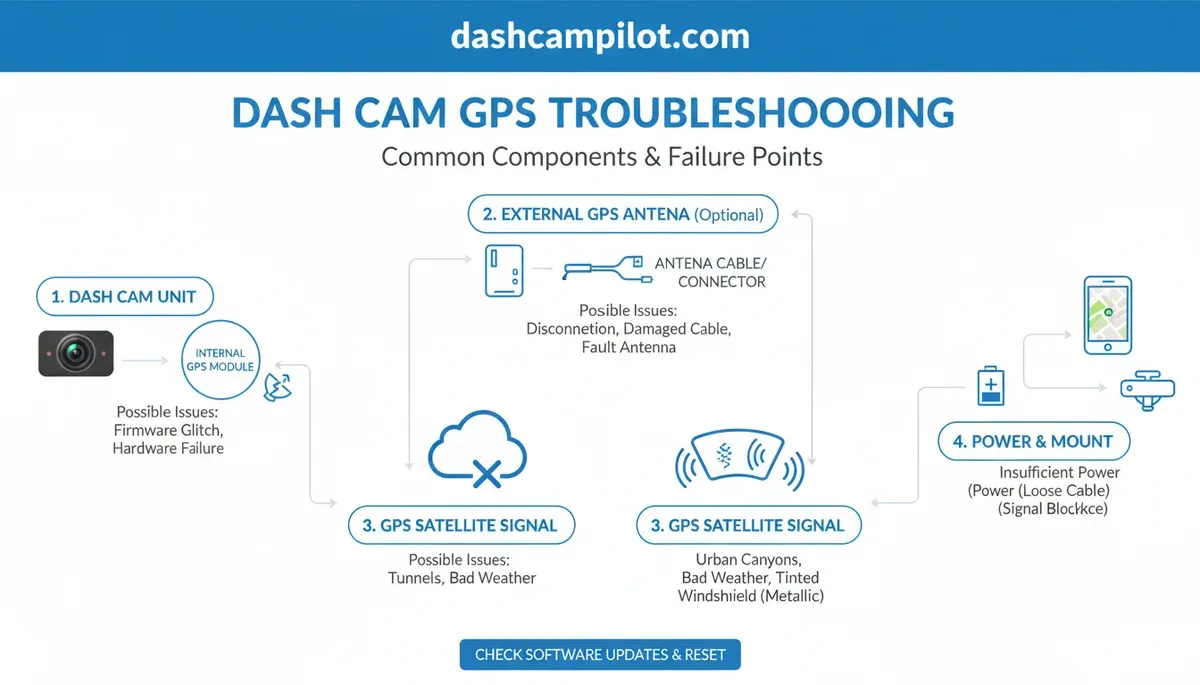
Your speed is missing because the GPS module cannot establish a stable connection with at least four satellites. This often occurs due to signal interference, outdated satellite data, or physical obstruction, preventing the system from calculating an accurate velocity.
Q2: How long does a dash cam take to get a GPS signal?
A dash cam usually takes between 30 seconds and 2 minutes to acquire a GPS signal during a cold start, especially after being off for an extended period. If the vehicle is moving or in a dense urban area, this initial acquisition time can be prolonged.
Q3: Can a dash cam work without GPS?
Yes, a dash cam will continue to record high-definition video even if the GPS is not working. However, you will lose the ability to log coordinates, speed data, and maintain accurate time synchronization, which reduces the overall utility of the recorded footage for forensic analysis.
Q4: Does windshield tint block dash cam GPS?
Yes, metallic or ceramic windshield tints can significantly degrade GPS signals by acting as a Faraday cage. Research shows that 'athermal' glass common in some vehicles, which reduces heat, specifically interferes with the GPS frequency band, leading to poor signal reception.
Q5: How do I reset my dash cam GPS?
You can reset the GPS by performing a factory reset through the settings menu or by updating the firmware to the latest version. For some external modules, unplugging the GPS antenna for 60 seconds and reconnecting it can force a hardware reset and fresh satellite search.
Most dash cam GPS failures in 2026 result from environmental interference or outdated firmware rather than permanent hardware death. Systematic troubleshooting, including cold starts and signal isolation, resolves over 80% of acquisition issues. Persistent failures often indicate a need for external antenna modules or manufacturer warranty claims.
Check your dash cam's official support page for the latest firmware patch before performing a hardware reset.